Check and submit your release
Before you can submit, every Preflight check must pass, you must answer any Spotify profile protection question, and you must make your Content ID & social choice. Then click Submit for review at the bottom of the builder.
Open Preflight
- In the builder, scroll to Review & submit.
- The Preflight card shows how many checks pass, for example "20 of 21 checks pass", or "Everything checks out" when you're ready.
- Click the card to see the list.
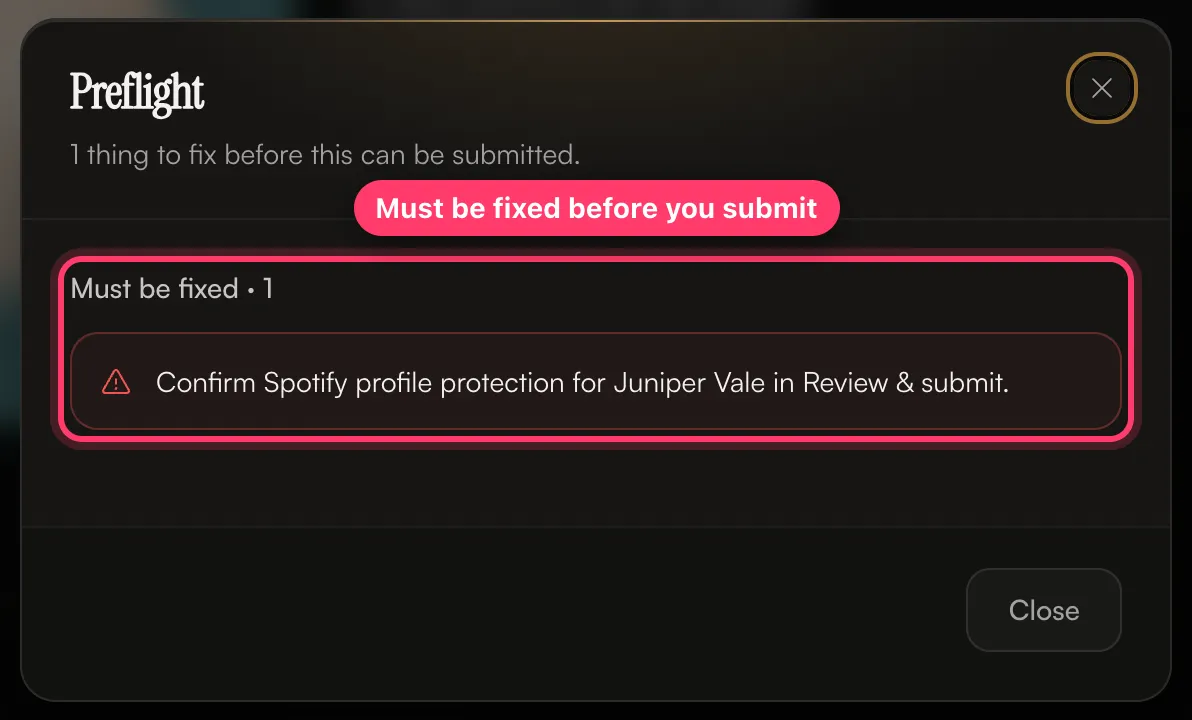
The list has two parts:
- Must be fixed: these block submission.
- Worth a look: warnings. You can submit with these, but check them.
Preflight updates as you edit. Fix an item, and it disappears from the list.
How to fix each check
Release details
Message | Fix |
|---|---|
"Release title is required" | Add a title in Release. |
"At least one primary artist is required" | Add an artist under Artists. |
"Artwork is required" | Upload a cover. See Artwork requirements. |
"Release date is required" | Pick a date. |
"Primary genre is required" | Pick a Genre. |
"Copyright (C) line is required" / "Phonogram (P) line is required" | Fill in Record label. |
"…needs a legal first and last name before this can be submitted" | Click the artist and add their legal first and last name. |
"…has no Spotify profile linked" (warning) | Link the artist's Spotify profile if they have one. If it's their first release, you can leave it. |
"Single-track releases should have the track title match the release title" (warning) | Use the same title for the release and the track. |
Tracks
Message | Fix |
|---|---|
"At least one track is required" | Upload audio in Tracks. |
"Track N: title is required" | Give the track a title. |
"…is missing its audio file" | Upload the audio for that track. |
"…needs its existing ISRC because it was previously released" | Enter the ISRC, or switch the track to New recording. |
"…is missing a songwriter", "…a performer credit", "…a production credit" | Add the missing credit. See Add songwriter, producer and performer credits. |
"…has no role assigned" | Pick a role for that person. |
"…says "remix" in its title or version but no one is credited as Remixer" | Credit the remixer. |
"…will be delivered as "Name Name"…" (warning) | Add the writer's full legal first and last name. |
Spotify profile protection
The first time we deliver to an artist's Spotify profile, Review & submit asks: Does this profile have Artist Profile Protection turned on? Preflight shows "Confirm Spotify profile protection for … in Review & submit." until you answer.
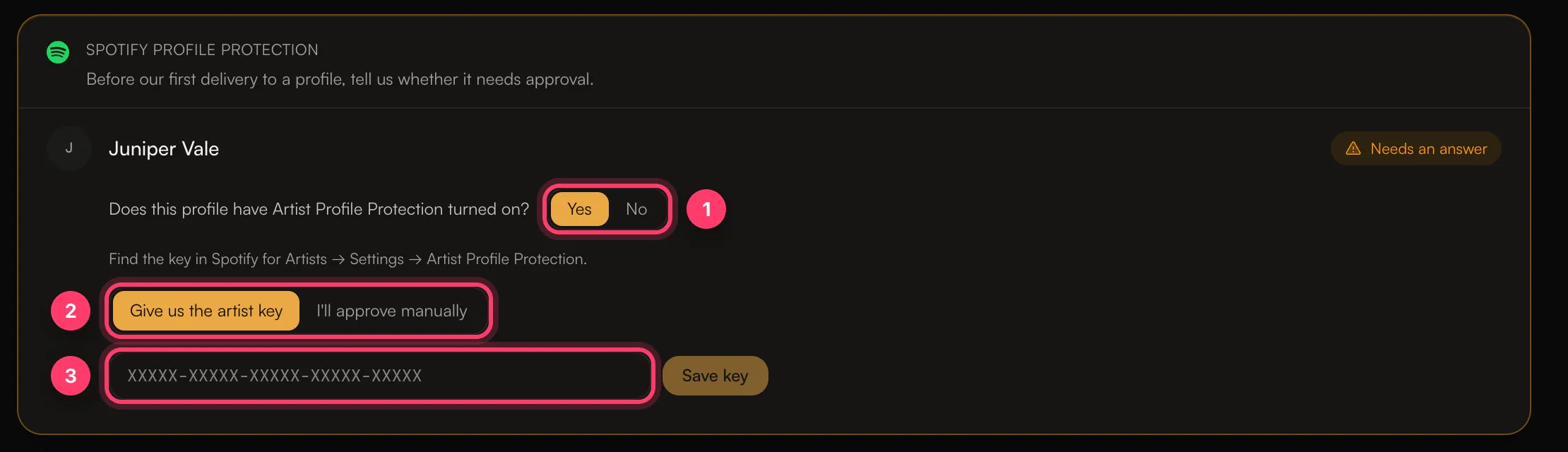
- No: click No, then Confirm protection is off.
- Yes: choose one:
- Give us the artist key: paste the key from Spotify for Artists → Settings → Artist Profile Protection and click Save key. It looks like
XXXXX-XXXXX-XXXXX-XXXXX-XXXXX. - I'll approve manually: you'll approve the release in Spotify for Artists yourself. Until you do, it may be delayed or not appear on the profile.
- Give us the artist key: paste the key from Spotify for Artists → Settings → Artist Profile Protection and click Save key. It looks like
If you're not sure, open Spotify for Artists → Settings and check.
Submit
When everything passes, click Submit for review. You'll see "Submitted for review" and we'll email you once it has been reviewed. Review usually takes 1–2 business days.
After you submit, the builder is locked. If we ask for changes, it opens again.
If you're on a label's roster
If your account is a sub-account under a label, your release goes to the label first and shows Label Review. The label can edit it and then send it on to us.
If you have an unsigned contract
If your account has a contract waiting for your signature, you'll see "Your account has a pending contract that must be signed before submitting releases." Open Agreements, sign it, and then submit.
Transfers without ISRCs
If you're moving a release from another distributor and some tracks have no ISRC, you'll be warned that tracks are missing ISRCs. Add them if you have them, so streams stay linked. You can still submit without them.
Common questions
The Submit for review button is greyed out.
Open Preflight and fix everything under Must be fixed, answer any Spotify profile protection question, and make your Content ID & social choice.
Can I edit my release after I submit it?
Not while it's in review. If something's wrong, send us a message from the chat on this page, or email team@ammdistro.com, and we can send it back to you.
Related: Create a release, step by step · Release statuses explained · Your release needs changes · Sign your release agreement
Updated on: 23/10/2026
Thank you!