Add songwriter, producer and performer credits
Every track needs at least one songwriter (a composer or lyricist), one producer and one performer. You add them in the Credits part of each track. Stores use these credits, and a track without them can't be submitted.
Open a track's credits
- Open your release in the builder and go to Tracks.
- Click a track to expand it and scroll to Credits.
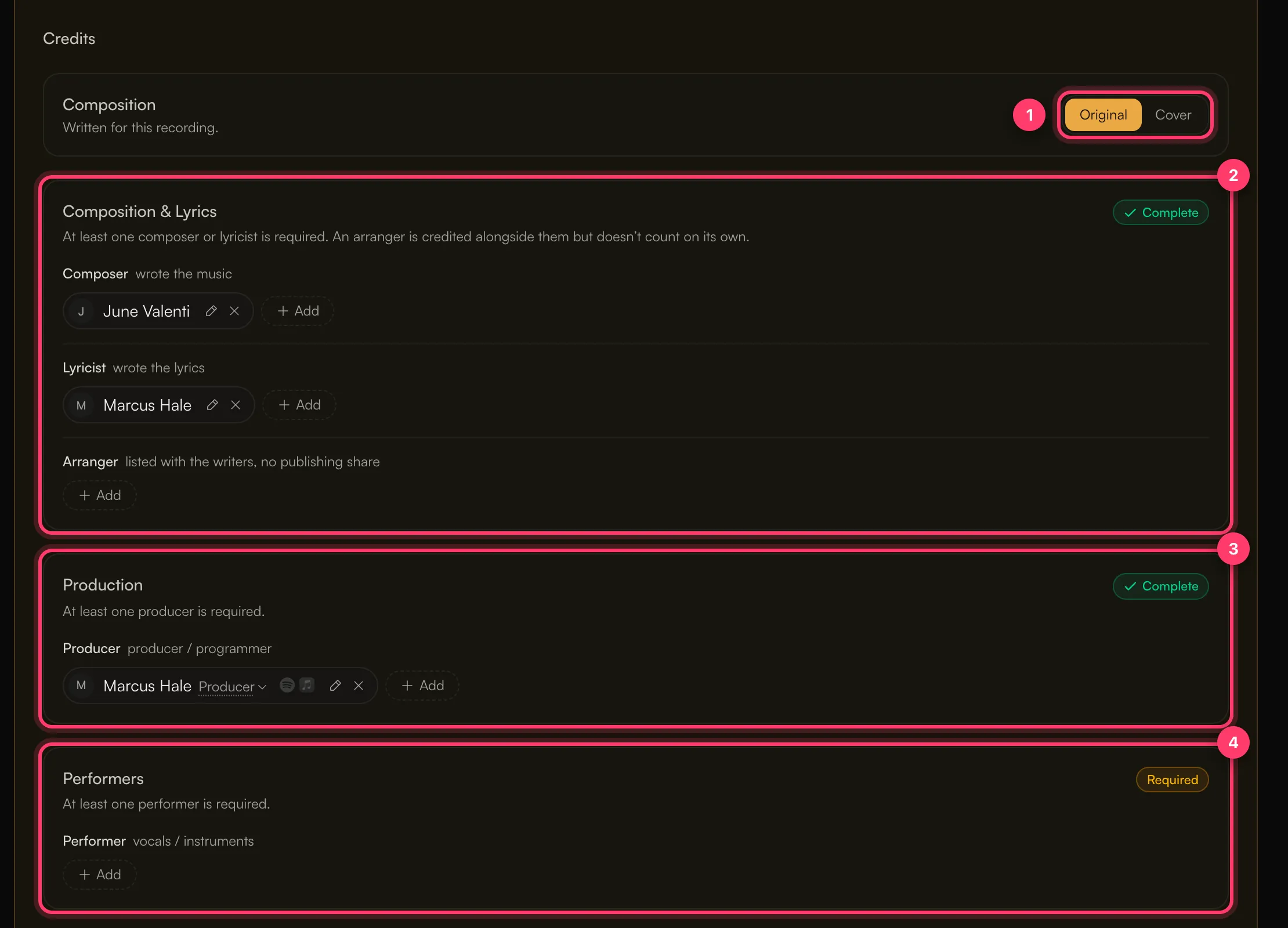
Each group shows Required until it has someone in it, then Complete.
The three groups
Composition & Lyrics
- Composer: wrote the music.
- Lyricist: wrote the lyrics.
- Arranger: listed with the writers, with no publishing share.
At least one composer or lyricist is required. An arranger is credited alongside them but doesn't count on its own.
Production
- Producer: the producer or programmer.
At least one producer is required. You can change a person's role here, for example to an engineering role, from the role menu next to their name.
Performers
- Performer: vocals or instruments. Pick every role that applies from the full list, such as Vocals, Lead Vocals, Guitar or Drums.
At least one performer is required.
Add a person
- Click Add in the right row.
- Under Who was it?, search for someone already on your account or type a new name.
- Under What did they do?, pick every role they had.
- For a new person, click Add to account. They'll be available on your other tracks too.
One person can have as many roles as they need. If you produced and sang on the track, add yourself under both.
Use Copy to all tracks to give every track the same credits, then adjust the ones that differ.
Writers need their legal name
Songwriters are delivered under their legal first and last name. Stores reject a single name, such as a one-word stage name, for writers. When you add a writer, enter their real first and last name.
If a writer only has one name on file, Preflight warns that it will be delivered as that name twice ("Name Name") so the stores accept it. Add their full legal name to avoid this.
Covers, interpolations and samples
If the track uses the melody or lyrics of another song, switch Original to Cover at the top of Credits and link the original song so its writers are credited. See Cover songs, samples and remixes.
Preflight messages about credits
Message | What to do |
|---|---|
"…is missing a songwriter (Composer, Lyricist, Songwriter…)" | Add a composer or lyricist. |
"…is missing a production credit (Producer, Engineer, Mixing Engineer…)" | Add a producer. |
"…is missing a performer credit (Vocals, Programmer, an instrument…)" | Add a performer. |
"…has no role assigned" | Pick at least one role for that person. |
"…says "remix" in its title or version but no one is credited as Remixer" | Credit the remixer. |
"writer shares total X% (must be 100%)" | This is a warning. Check the writers' shares add up to 100%. |
Common questions
Why don't my credits show on Spotify or Apple Music?
Each store decides which credits it displays and when. We deliver the credits you enter. It can take some time for them to appear, and some stores show only some roles.
Do credits affect who gets paid?
No. Credits say who did what. To share earnings, set up royalty splits on the release's Royalties tab.
Related: Create a release, step by step · Cover songs, samples and remixes · Titles, versions and featured artists · Check and submit your release
Updated on: 23/10/2026
Thank you!