Which stores does AMM Distro deliver to?
AMM Distro delivers to 44 stores and platforms: the major streaming services, social and video platforms, regional services in Asia, Africa, the Middle East and Russia, and services for fitness, venues and music recognition. You choose the stores for each release, and every release goes to all of them unless you pick a smaller set.
The store list
Group | Stores |
|---|---|
Streaming (15) | Spotify, Apple Music, YouTube Music, Amazon Music, TIDAL, Deezer, Pandora, iHeartRadio, SoundCloud, Audiomack, Qobuz, Napster, LiveOne, Mixcloud, Trebel |
Social & video (5) | TikTok, Instagram, Facebook, YouTube Content ID, Snapchat |
Asia, Africa & Middle East (13) | Tencent Music, NetEase Cloud Music, Alibaba, JioSaavn, Anghami, Boomplay, KKBOX, JOOX, AWA, FLO, POVU, iMusica, Nuuday |
Russia (3) | Yandex Music, VK Music, Zvuk |
Fitness, venues & sync (4) | Peloton, TouchTunes, AMI Entertainment, Lickd |
Recognition & credits (4) | Gracenote, Audible Magic, ACRCloud, Jaxsta |
The store picker in the release builder always shows the current list, so it can differ slightly from this table when a store is added or paused.
Choose stores for a release
You pick stores in the Review & submit section of the release builder.
- Open your release and scroll to Review & submit.
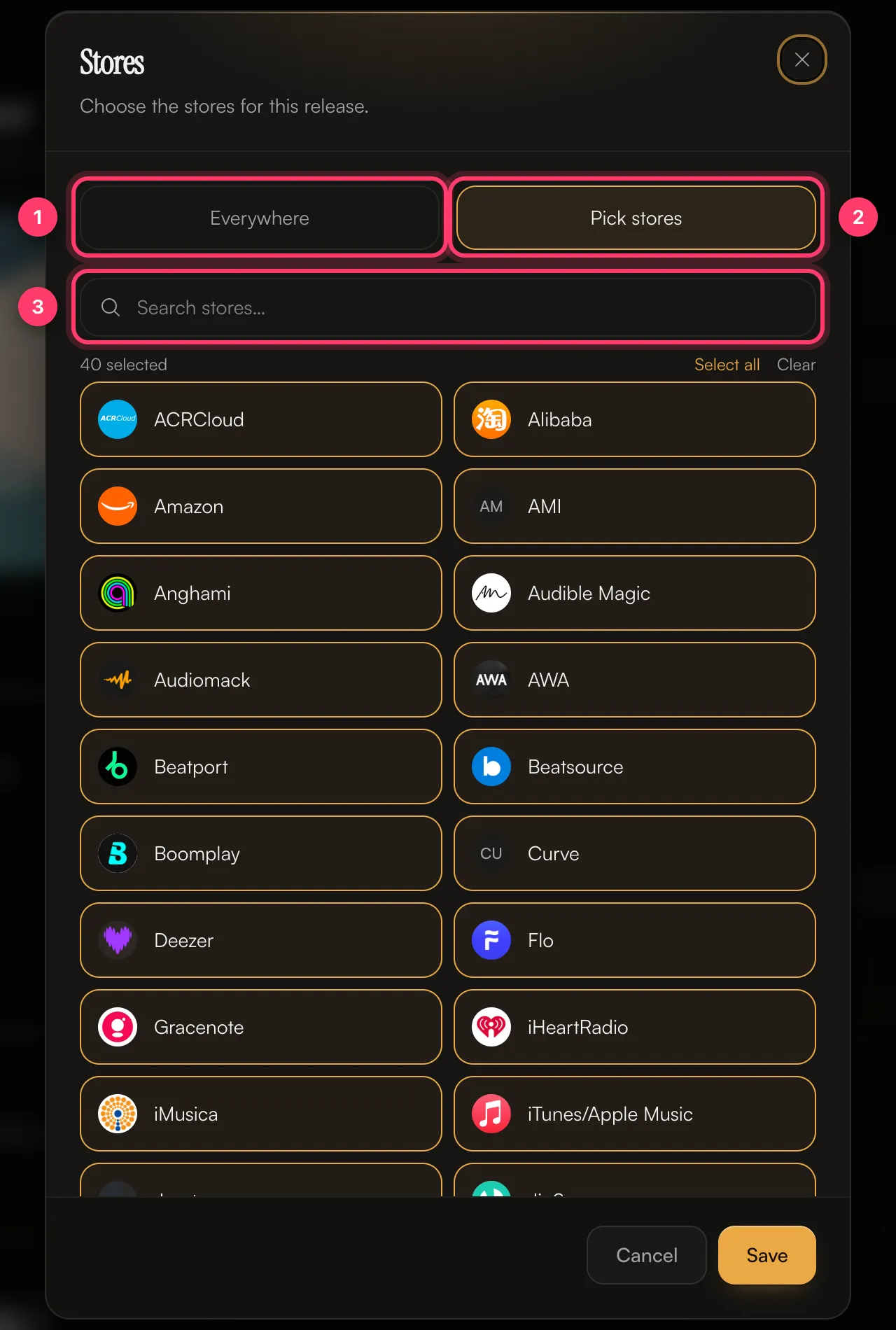
- Click the Stores card. By default it says All stores – Everywhere we distribute.
- Choose Everywhere to send the release to every store, or Pick stores to choose them yourself. Use Search stores… to find a store quickly, or Select all and Clear.
- Click Save. The card now shows the number of stores you picked.
Content ID and social platforms are a separate choice
TikTok, Instagram, Facebook, YouTube Content ID and SoundCloud's monetisation recognise your recording when other people use it in their videos and uploads. Because that only works if you hold the rights to everything in the track, you opt in to these separately, in the Content ID & social card in Review & submit. You have to make that choice before you can submit.
See Content ID and social platforms for what each option does and when not to opt in.
Countries
Every release goes Worldwide unless you change it. In the Territories card you can block a release in some countries, or release it only in the countries you choose.
Common questions
Can I add a store after my release is out?
Send us a message from the chat on this page, or email team@ammdistro.com, with the release name and the store you want to add.
Can I remove my release from one store only?
There's no button for this in the dashboard. Contact us and we'll handle it.
Do I pay extra for more stores?
No. Delivery to every store on the list, including YouTube Content ID, is included.
Why isn't my release on a store yet?
Each store takes a different amount of time to process a release. See I can't find my release in a store and Track your delivery.
Related: Choose stores and countries · Content ID and social platforms · Track your delivery · I can't find my release in a store
Updated on: 23/10/2026
Thank you!