Spotify Artist Profile Protection
Spotify Artist Profile Protection is a Spotify for Artists setting that makes Spotify hold new releases for an artist page until the artist approves them. Before we deliver to a Spotify profile for the first time, the release builder asks whether that profile has protection turned on, so your release isn't held back without you knowing.
When you'll see the question
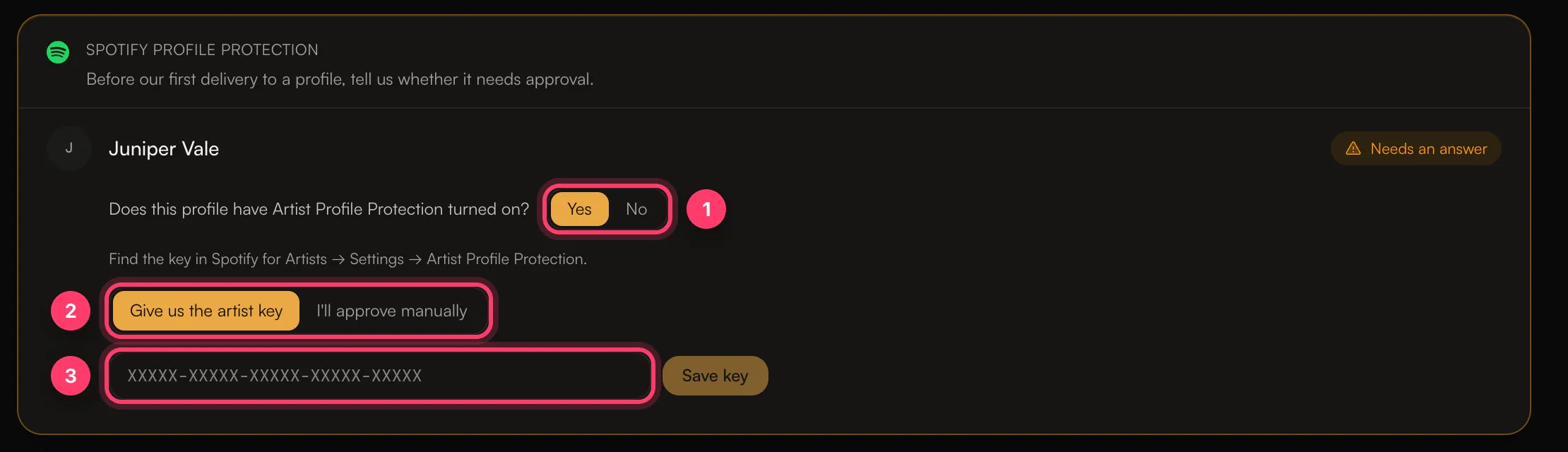
The Spotify profile protection panel appears in Review & submit when your release goes to Spotify and bills an artist whose Spotify profile we haven't delivered to from your account before. It says: "Before our first delivery to a profile, tell us whether it needs approval."
You answer once per profile. Your answer is saved on your account and used for later releases to the same profile.
Answer the question
For each artist, answer Does this profile have Artist Profile Protection turned on?
If protection is off
Click No, then Confirm protection is off. The status changes to Protection off.
If protection is on
Click Yes, then choose how the release should be approved:
- Give us the artist key. Paste the key in the format
XXXXX-XXXXX-XXXXX-XXXXX-XXXXXand click Save key. You find the key in Spotify for Artists → Settings → Artist Profile Protection. The status changes to Artist key saved. We store the key securely and use it so Spotify accepts the delivery. - I'll approve manually. You approve the release yourself in Spotify for Artists after it's delivered. Click I understand to confirm. Until you approve it, the release may be delayed or may not appear on the profile. The status changes to You'll approve in Spotify for Artists.
If you're not sure
Open Spotify for Artists for that artist and go to Settings → Artist Profile Protection. If you don't have access to the artist's Spotify for Artists, ask the artist or their team before you answer.
Statuses you may see
Status | What it means |
|---|---|
Needs an answer | Answer the question before you submit. |
Protection off | You told us protection is off. |
Artist key saved | We'll use the key you gave us. |
You'll approve in Spotify for Artists | Approve the release in Spotify for Artists after delivery. |
Delivered before | We've delivered to this profile from your account before, so no answer is needed. |
Common questions
My release is delivered but isn't on the artist page.
If you chose I'll approve manually, check Spotify for Artists for a release waiting for approval. If you gave us a key and the release still isn't there a few days after release day, send us a message from the chat on this page, or email team@ammdistro.com.
The artist turned protection on after we answered.
Send us a message from the chat on this page, or email team@ammdistro.com, so we can update the answer before the next delivery.
Does this apply to Apple Music or other stores?
No. This panel is only about Spotify.
Related: Link your Spotify and Apple Music artist profiles · My release is on the wrong artist page · Check and submit your release · Get access to Spotify for Artists and other artist tools
Updated on: 23/10/2026
Thank you!