Your music on TikTok, Instagram and YouTube
Your release can be used in videos on TikTok, Instagram and Facebook, and earn from YouTube videos through Content ID, if you opt in for that release in the builder. YouTube Music, the streaming service, is a regular store and gets your release like Spotify or Apple Music.
What you have to turn on
These platforms work differently from streaming stores: they recognise your recording when other people use it in their videos, and pay you for that use. Because of this, they're a separate choice in the release builder.
- In Review & submit, open the Content ID & social card.
- Choose Distribute to UGC.
- Tick I hold exclusive rights to this recording and every sample in it.
- Pick the platforms you want, and tick the extra YouTube confirmation if you picked YouTube Content ID.
- Click Save.
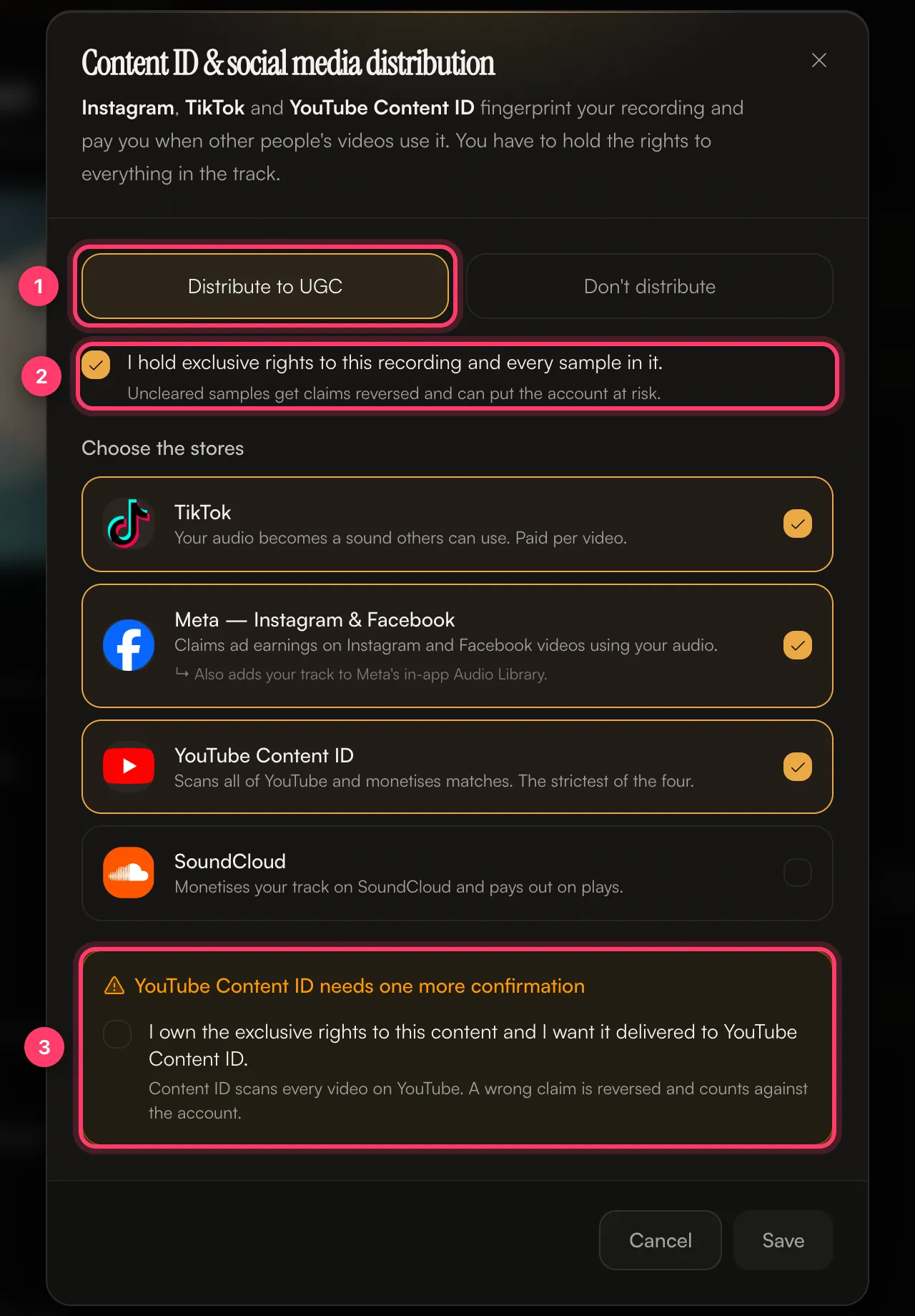
If you choose Don't distribute, the release still goes to the streaming stores you picked, including YouTube Music. It isn't sent to the platforms in the Content ID & social dialog.
See Content ID and social platforms for each option and when not to opt in.
What each platform does with your release
- TikTok: your audio becomes a sound others can use in their videos. Paid per video.
- Instagram and Facebook: your track is added to the in-app audio library, and ad earnings are claimed on videos that use your audio.
- YouTube Content ID: YouTube scans uploads for your recording and earns from videos that match. It's the strictest of the options. A wrong claim is reversed and counts against the account.
- YouTube Music: a streaming store. It's part of the main store list, not the Content ID choice.
Earnings from these platforms appear in your royalty statements with the other stores.
When a viral edit isn't linked to your release
Sped-up, slowed or remixed edits of your song are often uploaded to TikTok as someone's "original sound". When that happens, TikTok doesn't link it back to your release and it earns nothing for you. You can claim it from the release's TikTok tab. See Claim a TikTok sound for your release.
Common questions
My song isn't in the TikTok or Instagram sound library.
Check the release's Content ID & social choice. If the platform wasn't selected, or it was and the sound still isn't there, send us a message from the chat on this page, or email team@ammdistro.com.
My own YouTube video got a Content ID claim from my release.
Send us a message from the chat on this page, or email team@ammdistro.com, with the video link.
Someone else is claiming my song on YouTube or TikTok.
Contact us with the link to the claim or the video. Your manager handles copyright claims and false-claim disputes.
Can I turn these on after my release is out?
Contact us with the release name and the platforms you want.
Related: Content ID and social platforms · Claim a TikTok sound for your release · Which stores does AMM Distro deliver to? · Cover songs, samples and remixes
Updated on: 23/10/2026
Thank you!