Link your Spotify and Apple Music artist profiles
Linking an artist's Spotify and Apple Music profiles tells the stores which artist page your release belongs on. Do it before you submit. If an artist has no profile yet, leave the links empty and the stores will create one when the first release is delivered.
Why it matters
Stores match a release to an artist page using the profile you link. With no Spotify profile linked, the stores have to guess which artist page the release belongs to, and it can end up on another artist's page with the same name. The release check before submitting warns you about this: "…has no Spotify profile linked — the stores will guess which artist page this belongs to".
Link profiles when you add an artist in the builder
- In the release builder, find Artists and click Add.
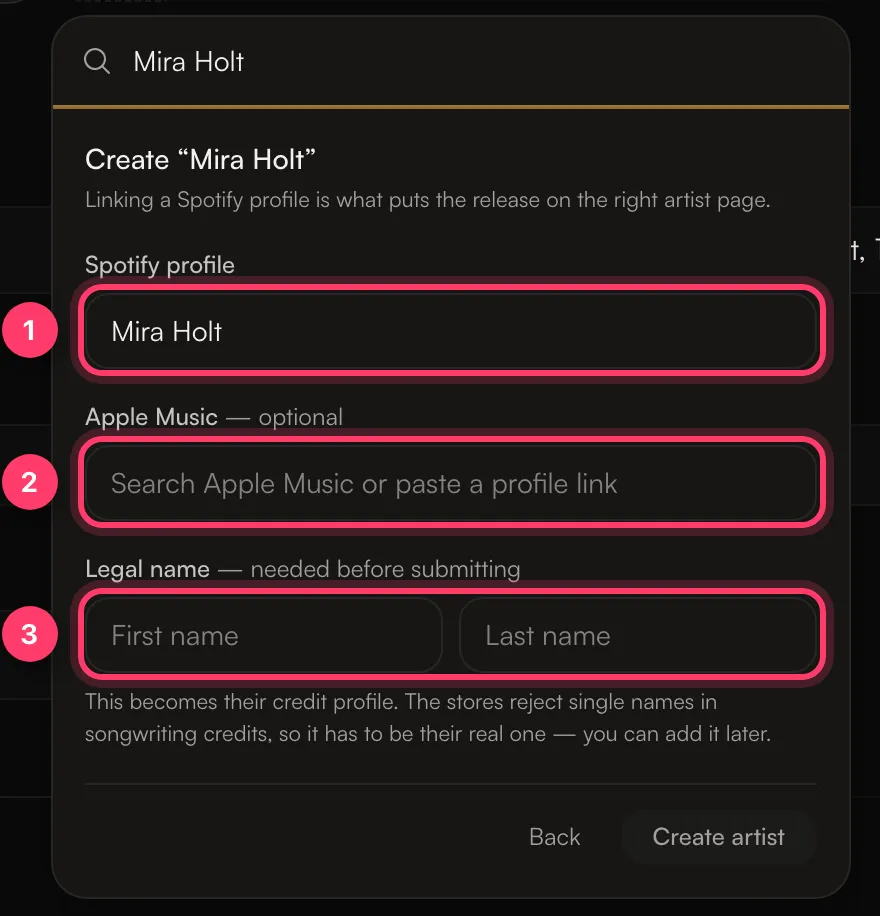
- Type the artist's name. If they're not on your account yet, click Create "Name".
- Under Spotify profile, search for the artist and pick the right profile, or paste the profile link.
- Under Apple Music, search or paste the profile link. This one is optional.
- Under Legal name, enter the artist's real First name and Last name. You can add it later, but it's needed before you submit.
- Click Create artist.
The artist chip on your release shows small Spotify and Apple Music marks when the links are set. If something is missing, the chip turns amber; hover over it to see what it still needs, for example "Still needs: Spotify profile".
You can also manage artists in Settings → Artists. See Manage your artist profiles.
The profile name must match
When you add a link, we check it with the store:
- If the link doesn't lead to an artist profile, you'll see "No Spotify artist found at that link".
- If the profile has a different name from your artist, you'll see a message like That Spotify profile is called "X", not "Y". Confirm it's the right artist to save it. Only confirm if you're sure it's the same artist, for example the same name written slightly differently.
- If the store can't be reached, you'll see "Could not reach the store to check that link. Try again."
When a Spotify profile spells the name differently only in capital letters, spacing or punctuation, we use Spotify's spelling for the artist.
Why we need a legal name
Every artist needs a legal first and last name before a release can be submitted. The chip shows Legal name on file or No legal name yet — needed before submitting. The legal name is used for songwriting credits, because stores reject single names there. Fans don't see it; your artist name stays as it is.
New artists with no profile yet
Leave the Spotify and Apple Music links empty. When the first release is delivered, the stores create new artist profiles. In most cases we then fill in the empty links on your account automatically. If a link is still empty a few days after the release is live, find the new profile in the store and add the link yourself. Empty links can always be filled in.
Links lock after delivery
Once a release with this artist has been delivered to the stores, the links that are filled in are locked so our records keep matching the stores. Empty links can still be filled in.
If you try to change a locked link, you'll see: "This artist has been delivered to the stores with these profile links, so they are locked. Contact support if a link is wrong."
Common questions
I have a profile on Spotify but not on Apple Music. What do I do?
Link Spotify and leave Apple Music empty. After the release is delivered, Apple Music matches it to a profile or creates one. You can add the Apple Music link to the artist at any time, since empty links can always be filled in.
My artist has the same name as another artist.
Link the right Spotify profile before you submit. That is what keeps your release off the other artist's page.
A link is locked and it's wrong.
Send us a message from the chat on this page, or email team@ammdistro.com, with the artist name and the correct profile link.
Related: Manage your artist profiles · Spotify Artist Profile Protection · My release is on the wrong artist page · Check and submit your release
Updated on: 23/10/2026
Thank you!