Claim a TikTok sound for your release
When an edit of your song (sped up, slowed, remixed) goes viral on TikTok under its own "original sound", TikTok often doesn't link it back to your release, so it earns nothing for you. Paste the sound link on the release's TikTok tab, check the match, and we file the claim for you.
The TikTok tab appears on releases that are Distributed or Live.
Claim a sound
- Open Releases and click the release the song is on.
- Click the TikTok tab.
- Paste the TikTok link into Paste a TikTok sound or video link. A link to the sound page works, and so does a link to any video that uses the sound.
- Click Find the match.
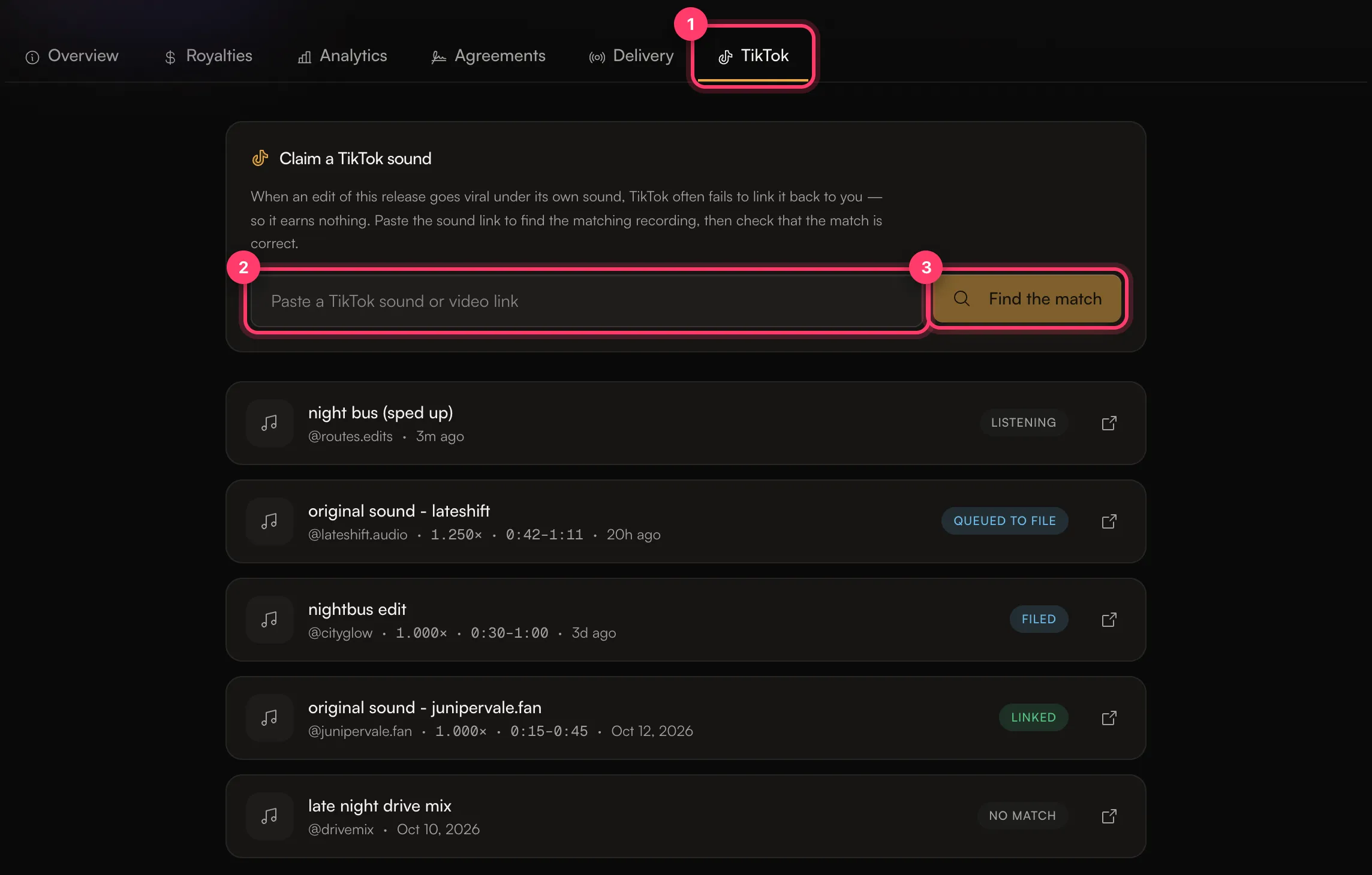
We listen through every recording on the release to find the one the sound uses. This shows as Listening.
Check the match
When we find a match, the sound shows Needs your check. Open it to see which recording matched and where in the track the sound starts and ends.
- Play the TikTok sound and your recording to make sure they're the same song.
- If several versions of the song match, pick the recording that should get the claim.
- Click Confirm match.
The sound moves to Queued to file, then Filed once we file the claim, and Linked once TikTok links the sound to your release. After a sound is linked we keep checking it, because TikTok links can be taken over later.
Statuses
Status | What it means |
|---|---|
Listening | We're comparing the sound with your recordings. |
Needs your check | We found a match. Check it and confirm. |
Queued to file | You confirmed the match. We'll file the claim. |
Filed | We filed the claim. Now we wait for TikTok. |
Linked | TikTok links the sound to your release. |
Linked elsewhere | The sound uses your music but TikTok credits a different recording. Confirm the match and we'll dispute it. |
No match | Nothing on this release matched closely enough. |
Rejected | The claim wasn't accepted. If we added a note, it explains why. |
Couldn't finish | Something went wrong reading the link. Click Try again. |
If there's no match
You'll see This isn't one of your recordings. If you're sure it's your song, it may be on a different release. Open that release's TikTok tab and try the link there. You can also click Try again or Remove.
Common questions
I pasted a sound I'd already sent in.
We open the claim you already have for it: "You've already sent in this sound".
The sound is already credited to me.
You'll see "TikTok already credits this sound to you. No claim is needed."
Can I do this from my phone?
Yes. In the AMM Distro app on iPhone or Android, share a TikTok link to the app from TikTok's share menu, or use the app's TikTok quick action.
My release isn't on TikTok at all.
Your release reaches TikTok only if you turned on TikTok in Content ID & social when you built it. See Your music on TikTok, Instagram and YouTube.
Related: Your music on TikTok, Instagram and YouTube · Content ID and social platforms · The AMM Distro mobile app
Updated on: 23/10/2026
Thank you!