Track your delivery
After your release is approved, you can follow it to each store from the release page. The status at the top shows where the release is overall, and the Delivery tab shows each store on its own.
Where to look
- Open Releases and click the release.
- The Status card on the Overview tab shows the overall status. Click View Delivery Details to jump to the store list.
- Or click the Delivery tab. It appears once the release has been queued for delivery.
Release statuses after approval
Status | What it means |
|---|---|
Approved | "Approved and being prepared for delivery." |
Awaiting Signature | Sign the release agreement to continue. Delivery starts after it's signed. |
Delivering | The release is being packaged and sent to the stores. |
Distributed | The release is in the stores and goes live on the release date. |
Live | "Available on streaming platforms." |
Delivery Hold | "Delivery is paused while we resolve a distribution issue." Our team has been notified and we'll be in touch. |
The release moves from Delivering to Distributed or Live as soon as the first store has it, so some stores may still be processing it after the status changes.
The Delivery tab
The Platform Delivery Status panel shows how many stores have the release, and a card for each store.
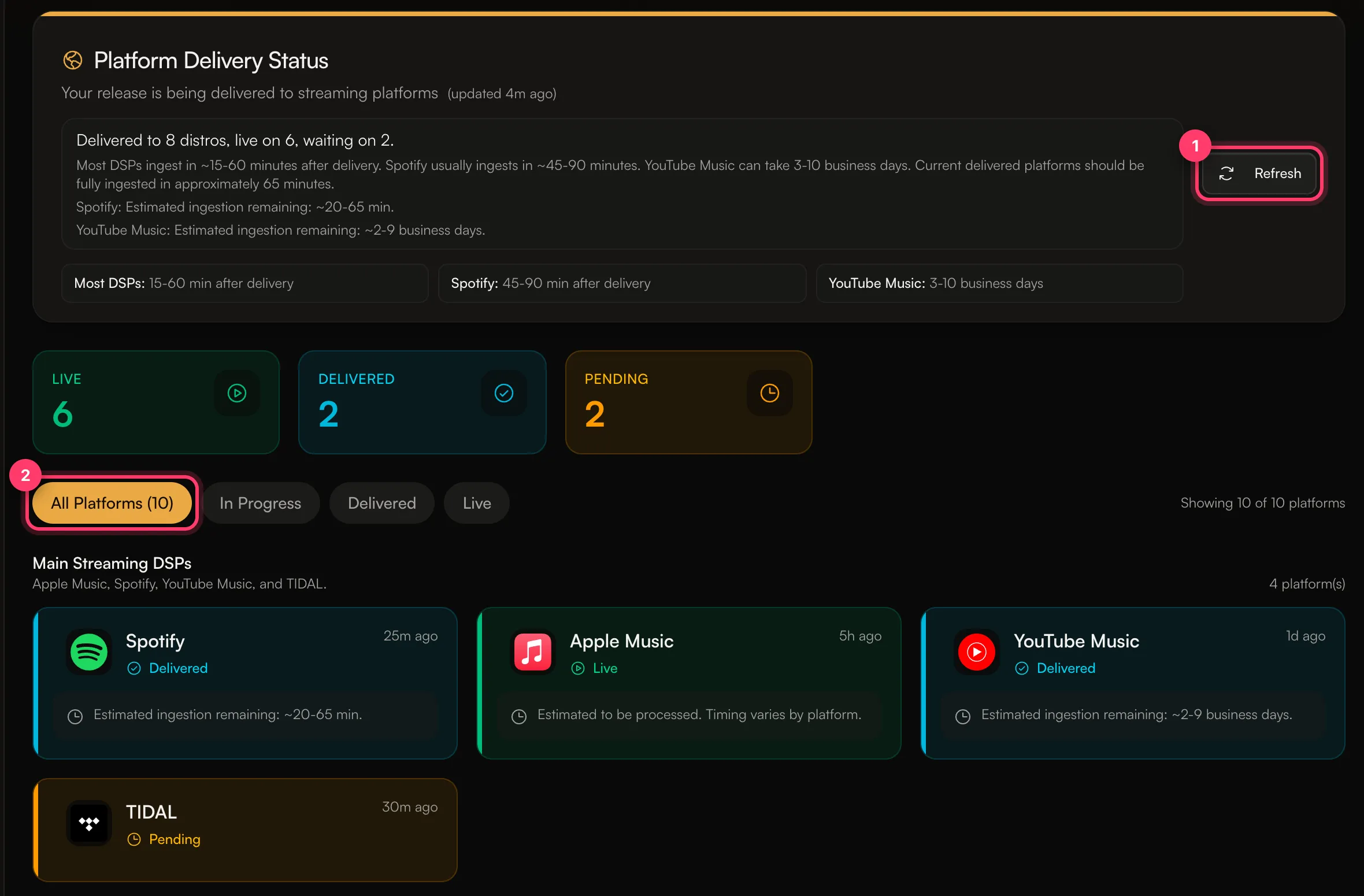
- Live: the store is showing the release to fans.
- Delivered: the store has the release and is processing it, or it goes live on the release date.
- Pending: the release hasn't reached that store yet.
Use the filters (All Platforms, In Progress, Delivered, Live) to narrow the list, and Refresh to load the latest status.
How long stores take
The tab shows an estimate for each store. Typical times after delivery:
- Most stores: about 15–60 minutes.
- Spotify: about 45–90 minutes.
- YouTube Music: 3–10 business days.
Some stores take several business days to process a release. Processing times are estimates and vary by platform.
Notifications
With Release Updates turned on in Settings → Notifications, we email you about release approvals, rejections and changes needed. The AMM Distro mobile app shows the same statuses and can send push notifications.
Common questions
My release says Live, but I can't find it on a store.
Check that store's card on the Delivery tab. See I can't find my release in a store.
My release is on Delivery Hold.
You don't need to do anything unless we contact you. If it's been on hold for a while, send us a message from the chat on this page, or email team@ammdistro.com.
My release is stuck on Awaiting Signature.
Open the release and sign the agreement. If collaborators also need to sign, delivery starts once everyone has signed.
Related: I can't find my release in a store · Which stores does AMM Distro deliver to? · The AMM Distro mobile app
Updated on: 23/10/2026
Thank you!