Get paid as a creator
When your work is approved, the money moves to your available balance in Earnings. We pay it out to your PayPal or bank account once your balance reaches the minimum (usually $25), you've added a payout method and your tax form is approved. You don't need to request a payout.
Check your balance
In the left menu, open All apps and choose Earnings.
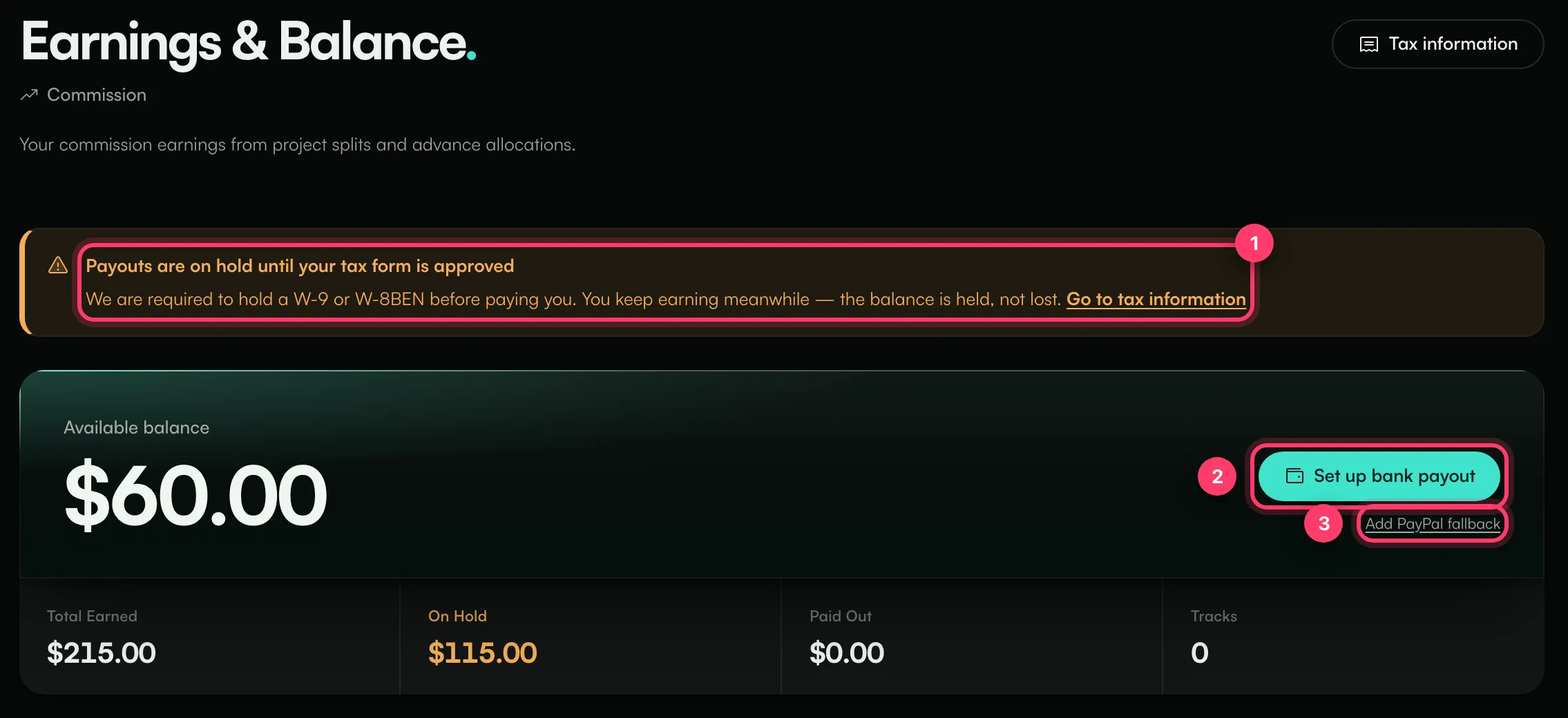
- Available balance: approved money waiting to be paid out.
- Total Earned: everything you've earned, including money still on hold.
- On Hold: money for work that isn't approved yet, and bonuses still in their holding period.
- Paid Out: money already sent to you.
If your balance is below the minimum, you'll see "Paid out once your balance reaches $25". It stays in your balance and is paid in a later payout.
The same totals appear at the top of My Work as In escrow, Available and Withdrawn.
Before your first payout
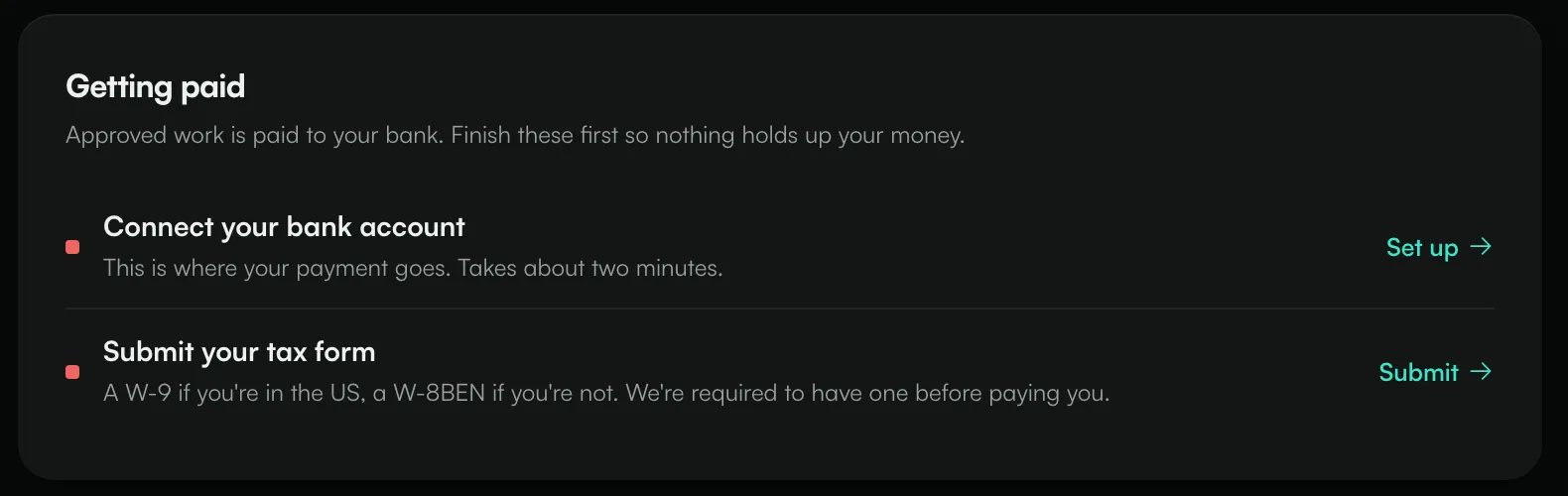
You need two things: a payout method and an approved tax form. Each claim page has a Getting paid card that shows what's still missing.
Add PayPal
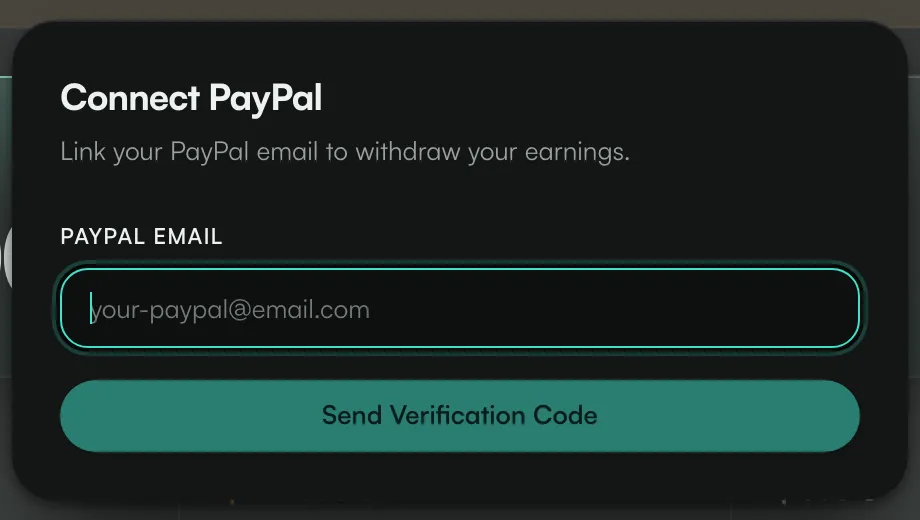
- On Earnings, click Connect PayPal (or Add PayPal fallback if you also see Set up bank payout).
- Enter your PayPal Email and click Send Verification Code.
- We send a 6-digit code to that PayPal email address. Enter it within 30 minutes.
You'll see "PayPal email verified". For your security, we also email the address you sign in with to say a PayPal address was added, and we wait 72 hours before sending any payout to a newly added PayPal address. If you didn't add it, contact us straight away.
Add a bank account
If you see Set up bank payout on Earnings:
- Click Set up bank payout.
- Under "Where is your bank account?", choose the country of your bank and click Continue.
- Enter your bank and identity details in the secure form.
We send payouts in US dollars. If your bank account is in another currency, the amount is converted when it arrives.
If you've set up both PayPal and a bank account, payouts go to PayPal unless you ask us to use your bank.
File your tax form
We're required to have a tax form before we pay you: a W-9 if you're in the US, a W-8BEN if you're not.
- On Earnings, click Tax information (or click your name at the bottom of the left menu and choose Tax forms).
- Click File your tax form and complete it.
While it's in review you'll see "Tax form in review". If it's rejected, you'll see why; click Fix it and file again. Until it's approved, Earnings shows "Payouts are on hold until your tax form is approved". You keep earning in the meantime; your balance is held, not lost.
When you get paid
We send payouts in regular payout rounds to everyone whose balance is ready. A small processing fee is taken from each payout. The Paid Out total and the claim status (Paid) update once it's sent.
Common questions
How do I change my PayPal email?
Once a PayPal email is set, you can't change it yourself. Send us a message from the chat on this page, or email team@ammdistro.com, and we'll update it after checking it's you.
My balance shows "Balance locked"
Your balance is on hold while we look into something on your account. The reason is shown next to the message. Contact us if it isn't clear.
I'm outside the US. Can I still get paid?
Yes. File a W-8BEN. If your country has no tax treaty with the US, US tax may be withheld at the standard 30% rate. Contact us if a treaty covers you.
My payment for an approved video seems low
On some campaigns, ANTHM's commission comes out of the campaign pay. What's credited to you is what you see in My Work and Earnings. If something still looks wrong, see "Something went wrong with a campaign".
Related: Claim statuses, deadlines and reminders · View bonuses · Open-call campaigns · Something went wrong with a campaign
Updated on: 23/10/2026
Thank you!