Submit your video
Once your claim is accepted, make the video, post it from your own account, then paste the link on the claim in My Work and click Submit for review. The artist or label reviews it and either approves it or asks for changes.
Before you post
- Read the brief and the requirements on the campaign again: the sound to use, hashtags, and anything the brief asks for.
- Use the campaign sound. Tap Use this sound on the campaign to open it.
- Post from the TikTok account you connected to ANTHM.
- If the campaign has a creator agreement, sign it first. See "Sign the creator agreement".
Submit the link
- In the left menu, open All apps and choose My Work.
- Find the campaign and click Open.
- Under Deliverables, choose the platform (TikTok, Instagram, YouTube, Snapchat or X / Twitter) and paste the link to your post. On TikTok, tap Share, then Copy link.
- If the campaign asks for more than one post, click Add link for each one.
- Optionally add notes for the reviewer, for example when you posted.
- Click Submit for review.
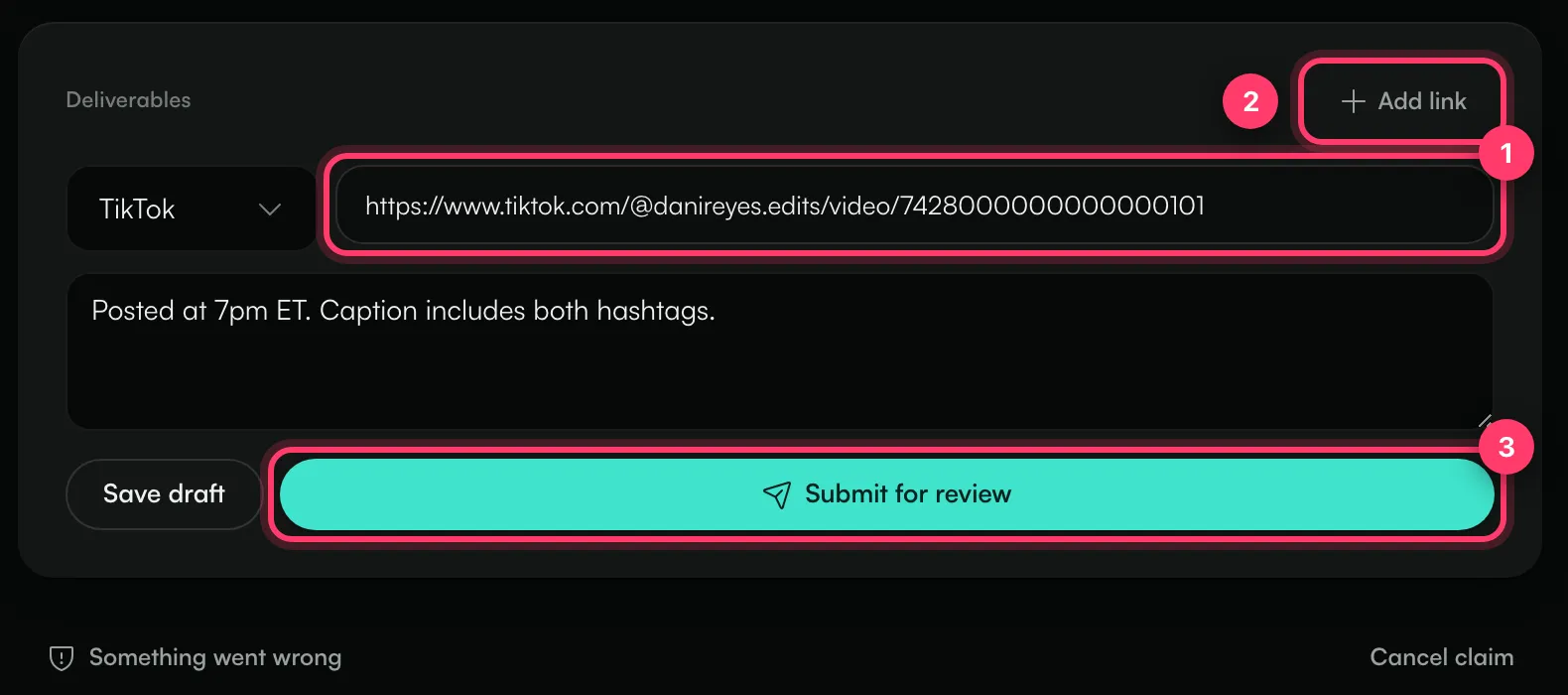
You'll see "Submitted for review!" and the claim moves to In Review. Not ready to submit? Click Save draft to keep your links without sending them.
When you submit, ANTHM checks each link: that the post can be opened, that it was posted from your connected account, and that it uses the campaign sound. Some campaigns only accept a submission when every video passes these checks.
After you submit
- Approved: you'll see "Approved — funds released". Your payment for the video moves to your available balance. See "Get paid as a creator".

- Revision requested: the reviewer's note appears on the claim. Make the change, update the link if needed, and click Submit for review again.

Keep your post public. Some campaigns ask you to keep it up for a set time, and campaigns with view bonuses keep counting views after approval.
If submitting doesn't work
Message | What to do |
|---|---|
Add at least one deliverable link first | Paste the link to your post. |
Sign the campaign agreement before submitting your work. | Sign the creator agreement for this campaign, then submit again. |
This campaign requires every video to pass verification before you can submit. | Check the post is public, was posted from your connected account and uses the campaign sound. |
This claim changed state while you were submitting. Refresh. | Reload the page and check the claim's status. |
Common questions
Can I change my link after submitting?
While the claim is In Review, you can't edit it. If you submitted the wrong link, send us a message from the chat on this page, or email team@ammdistro.com, with the campaign name and the right link.
Can I post from a different account?
Post from the TikTok account you connected. Videos from other accounts fail the check.
I can't deliver after all
Click Cancel claim at the bottom of the claim. You can cancel any time before the work is approved. The spot goes back to the campaign.
Related: Claim statuses, deadlines and reminders · Sign the creator agreement · Get paid as a creator · Something went wrong with a campaign
Updated on: 23/10/2026
Thank you!