Open-call campaigns
An open-call campaign is a campaign page at an address like anthm.tech/s/… that anyone can join. You make a video with the song, post it on TikTok and paste the link. A person reviews each video, and approved videos are paid by views until the campaign's money runs out or its end date passes.
Read the campaign page
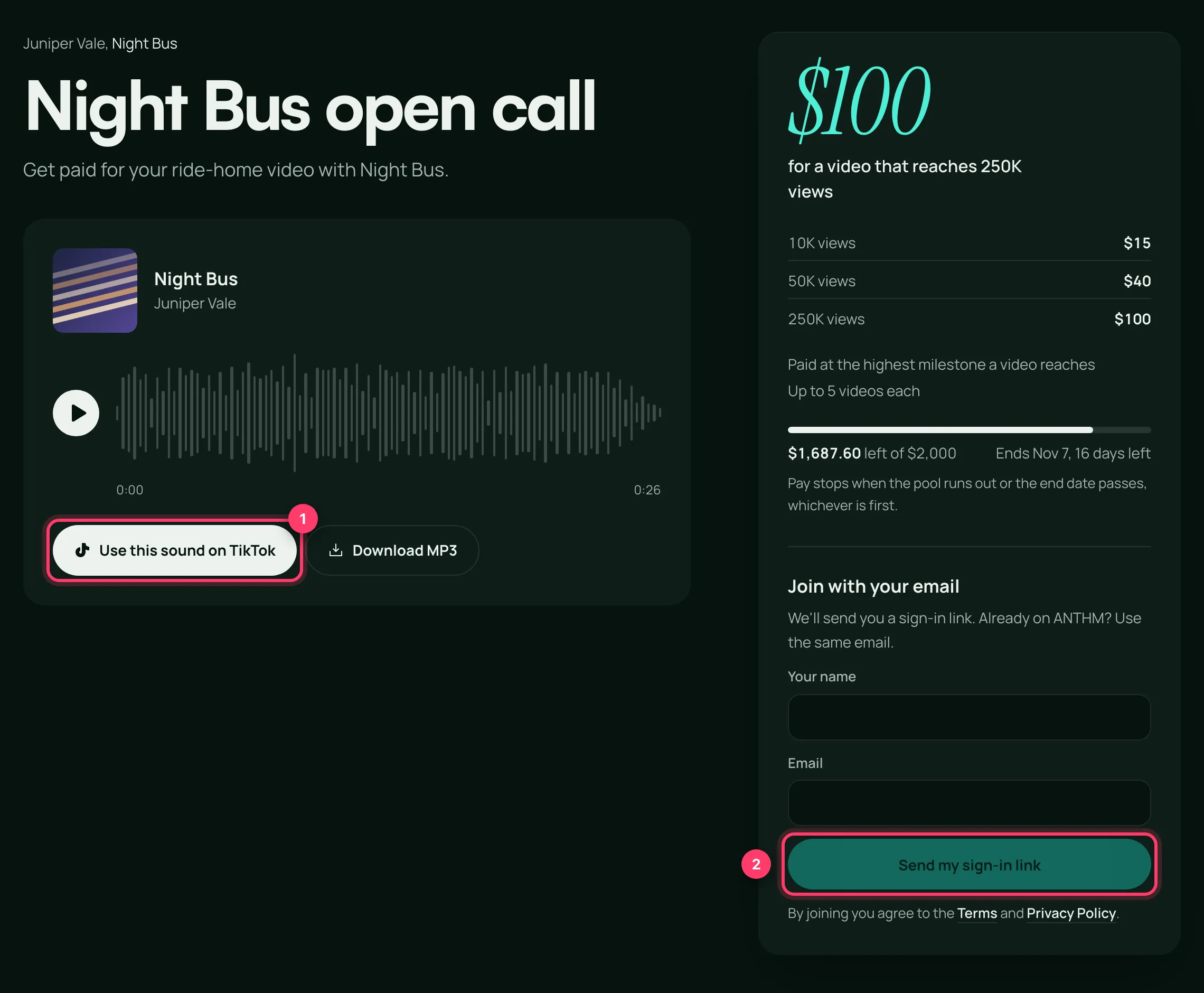
- The sound: play the song, click Use this sound on TikTok to open the sound in TikTok, or Download MP3.
- The pay box shows how videos are paid. It's one of two kinds:
- Milestones, for example "$15 at 10K views, $40 at 50K, $100 at 250K". A video is "Paid at the highest milestone a video reaches", so a video at 60K views earns the 50K amount, not both.
- Per views, for example "$X for every 1K views on an approved video", sometimes with "Up to $X per video" and "Starts counting once a video passes N views".
- Up to N videos each: the most videos you can enter.
- The pool: how much money is left (for example "$1,687.60 left of $2,000") and when the campaign ends. "Pay stops when the pool runs out or the end date passes, whichever is first."
- The brief and The quality bar: what the video should be. Every campaign requires a real video you made for it, with visible effort, posted from the TikTok you connect, after the campaign started. AI-generated video, slideshows, lyric-only templates and reposted clips don't count. A person reviews every video, and ones that miss the bar don't earn.
Join
- Under Join with your email, enter Your name and Email, complete the check, and click Send my sign-in link.
- Open the email and click the link. It expires in an hour, so check spam if you don't see it. If you're already on ANTHM, use the same email.
- Back on the page, tick "I've read the brief and the quality bar, and I'll only submit videos I made." and click Join this campaign.
Connect your TikTok
Click Continue with TikTok and sign in. This proves the account is yours.
If TikTok login isn't offered, you'll use a bio code instead: enter Your TikTok handle, click Next, add the code shown to your TikTok bio, save it, then click Check my bio.
Submit a video
- Post your video on TikTok, ideally with the campaign sound.
- In TikTok, tap Share, then Copy link.
- On the campaign page, under Submit a video, paste the link (or click Paste) and click Submit.
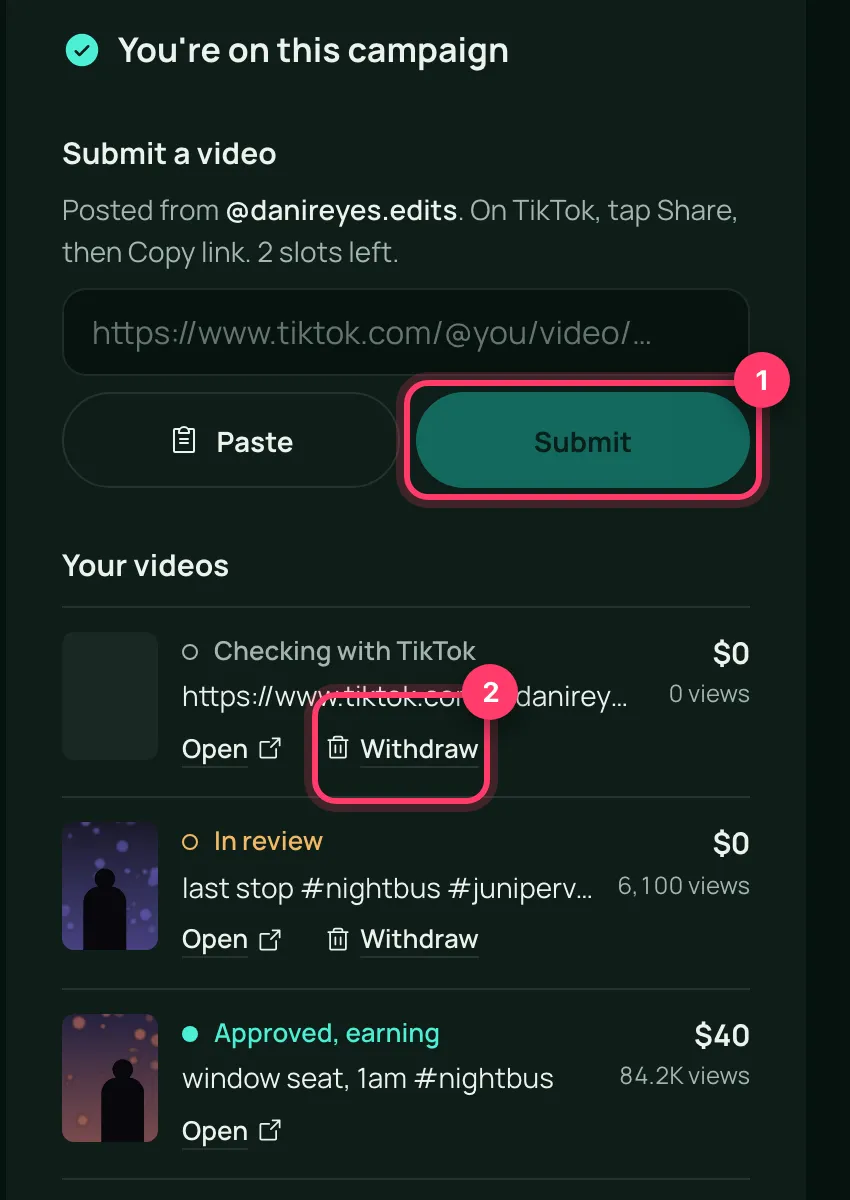
You'll see "Submitted. We'll review it soon." The video appears under Your videos.
Video statuses
Status | What it means |
|---|---|
Checking with TikTok | We're confirming the video is yours and was posted during the campaign. |
In review | A person is reviewing the video. |
Approved, earning | The video is approved and earns as its views grow. |
Not approved | The video didn't meet the brief or the quality bar. |
Removed | The video was removed from the campaign. |
Can't be counted | The video failed a check, for example it was posted from a different TikTok than the one you connected, before the campaign started, or after it ended, or someone else already entered it. |
You can Withdraw a video while it's still being checked or reviewed and hasn't earned anything.
A note under a video explains a failed check, for example "TikTok couldn't open it. Is the video public?" A video that isn't on the campaign sound can still be approved, but the note "Not on the campaign sound. That's allowed, but we asked for it." appears.
Getting paid
Your earnings shows three amounts:
- Counting: money your approved videos have earned so far. It's checked before payout.
- Ready to pay: checked and waiting for the next payout.
- Paid: already sent to you.
We count views from TikTok's public view count until the campaign ends, and check them before paying. Payouts go to your bank or PayPal. Before we can pay you, add a payout method and file your tax form; the page links to both under "Before we can pay you:". See "Get paid as a creator".
Common questions
The page says "Paused for now"
Submissions are paused. Your approved videos keep counting. Check back later.
The page says "This campaign has ended"
The pool has been fully earned or the end date passed. You can't add videos, but your earnings are still shown.
"You've submitted the maximum of N videos for this campaign"
You've reached the campaign's limit.
I think my video was rejected by mistake
Reply to any email from us, or send us a message from the chat on this page, or email team@ammdistro.com, with the campaign and the video link.
Related: Get started as a creator · Get paid as a creator · Join the ANTHM Discord · View bonuses
Updated on: 23/10/2026
Thank you!