Account credit and refunds
When you close a creator campaign, the money it didn't spend becomes account credit. You can use credit to fund your next campaign straight away, or ask for it to be refunded to the card that paid.
Close a campaign and get the unspent money back
- Open All apps → Campaigns in the left menu and click the campaign.
- In Close & reconcile, click the close button. It shows the amount that comes back, for example Close and return $180.00. If nothing is left over, it reads Close campaign.
You'll see "Closed — $180.00 returned to your account credit". Closing stops new claims on the campaign.
If some creators are still working, the pay reserved for them stays with the campaign until their claims finish. The page tells you how much is still reserved. Close the campaign again once those claims are done to return the rest.
When everything is settled, the section shows "Reconciled. Anything left over is now account credit."
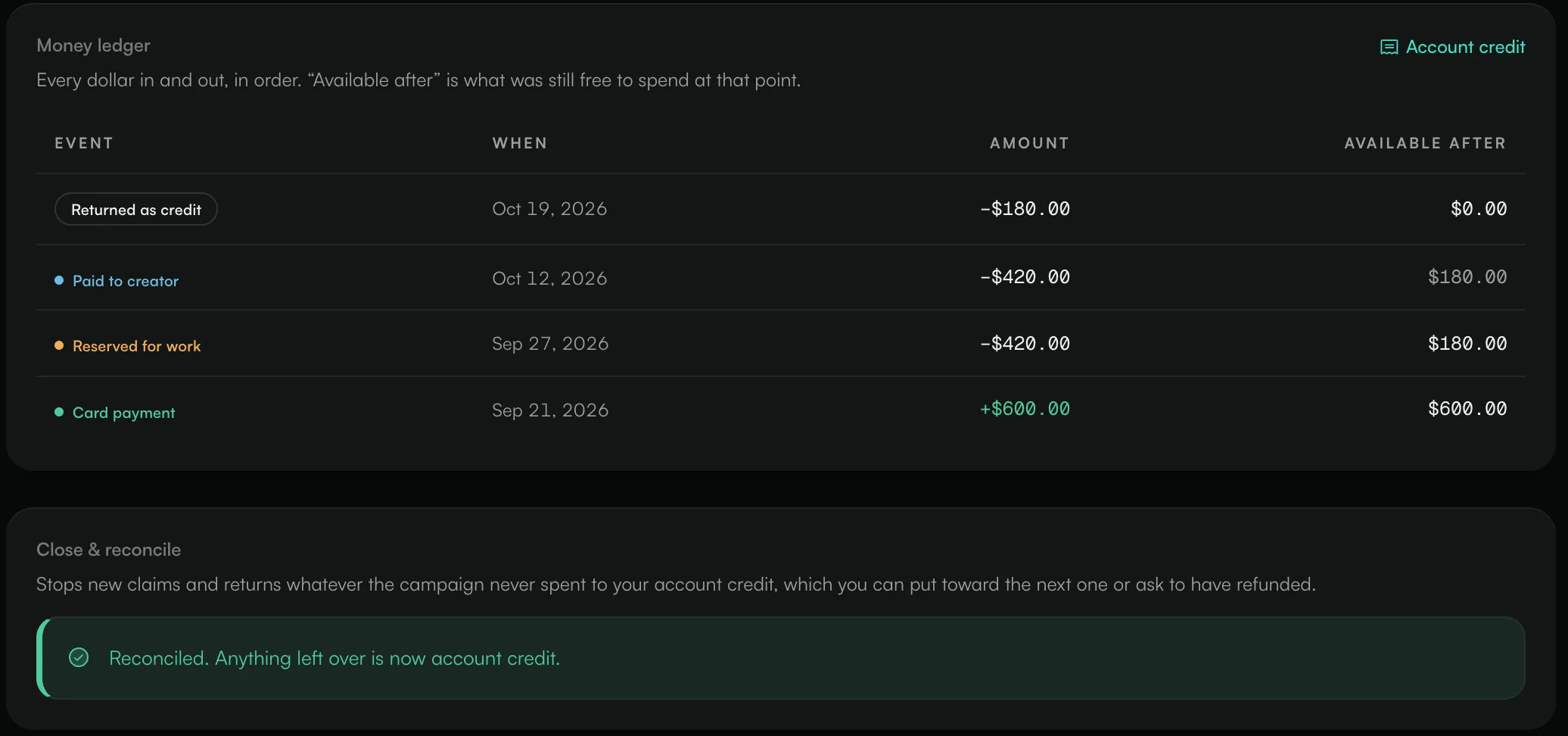
Read the money ledger
The Money ledger on each campaign lists every amount in and out, in order. Available after is what was still free to spend at that point.
Event | What it means |
|---|---|
Card payment | You funded the campaign by card. |
Complimentary | The campaign was funded outside the app, for example a budget you arranged with the ANTHM team. |
Paid with credit | You funded the campaign with account credit. |
Reserved for work | A creator was accepted and their pay was set aside. |
Paid to creator | An approved video was paid. |
Reservation returned | A claim ended without approval and its reserved pay went back to the campaign. |
Returned as credit | Unspent money moved to your account credit when the campaign closed. |
Refunded to card | Money went back to your card. |
Dispute adjustment | The amount changed after a dispute was resolved. |
See your account credit
Click Account credit at the top right of a campaign's Money ledger to open the credit page.
- Available: credit you can spend now.
- Awaiting refund: credit you've asked to have refunded. It's already taken off your available balance.
- Credit history: every change to your credit, with the date and your balance after it.
Use credit on a campaign
On a campaign that needs funding, click Pay with credit. If your credit covers the whole amount, no card is needed. If it covers part of it, the checkout charges only the rest. See "Fund and publish a campaign".
Ask for a refund to your card
- On the Account credit page, go to Send it back to my card.
- Enter an Amount, up to your available credit.
- Optionally add a Reason. It helps us review the request faster.
- Click Request refund.
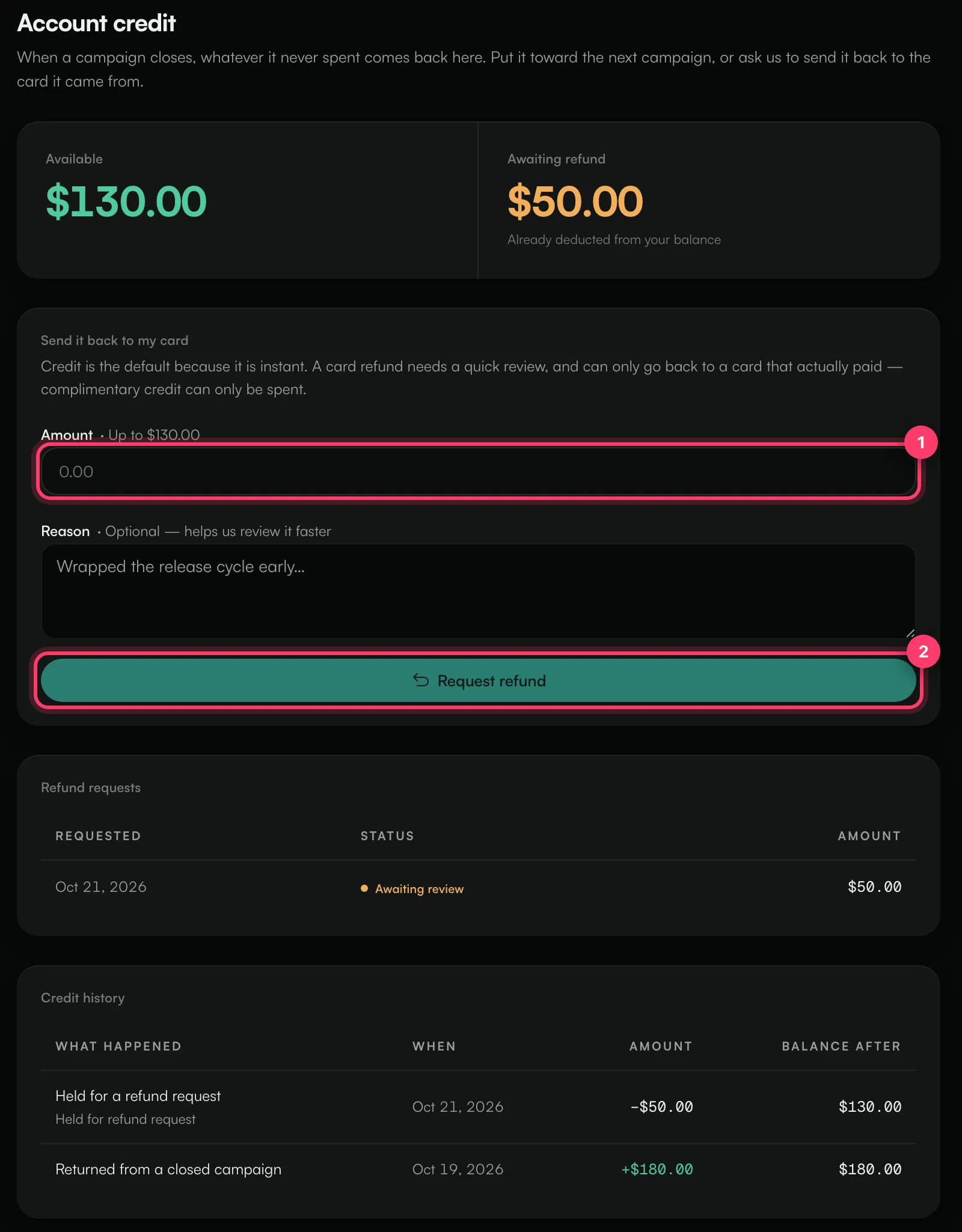
You'll see "Refund requested — an ANTHM admin will review it". The amount moves to Awaiting refund straight away, so it can't be spent while the request is reviewed.
Your request appears under Refund requests with one of these statuses:
Status | What it means |
|---|---|
Awaiting review | We haven't reviewed the request yet. |
Approved | The refund was approved and is being sent. |
Processing | The refund is on its way to your card. |
Refunded | The money was sent back to your card. |
Failed | The refund couldn't be completed. The amount goes back to your credit. |
Declined | The refund wasn't approved. The amount goes back to your credit. |
When a refund is declined or fails, the credit history shows "Refund returned to credit".
Common questions
Why can't I refund some of my credit?
Refunds can only go back to a card that paid in the app. Credit from a campaign funded outside the app (shown as Complimentary in its ledger) can be spent on campaigns but not refunded to a card. If your account has no card payment, you'll see "There is no card payment on this account to refund to."
Is credit used automatically?
No. You choose Pay with credit when you fund a campaign. Otherwise the credit stays on your account.
Does credit expire?
The app doesn't show an expiry date for credit. If you have a question about your balance, contact us.
Need help with a refund?
Send us a message from the chat on this page, or email team@ammdistro.com.
Related: Fund and publish a campaign · Review creator submissions · Billing and your subscription
Updated on: 23/10/2026
Thank you!