Review creator submissions
For campaigns on the Campaigns page and Ignite campaigns, your ANTHM manager checks each creator's video against your brief and approves it. Approved videos are paid from the campaign's funding automatically. You can follow every claim and every posted video, with its views, from ANTHM.
If you run a collab yourself with Collabs, you approve the drafts there. See "Collabs: work with creators directly".
See where each creator is
Open All apps → Campaigns in the left menu and click a campaign. Creator activity shows how many creators are at each stage.

Stage | What it means |
|---|---|
Applied | The creator asked to join and is waiting to be accepted. |
Accepted | The creator was accepted. Their pay is now reserved from the campaign. |
In progress | The creator is working on the video. |
In review | The creator sent their video and it's being checked. |
Revision requested | The creator was asked to change something and send it again. |
Approved | The video was approved. The reserved pay is released to the creator. |
Paid | The creator has been paid. |
Not accepted | The application wasn't accepted. Nothing was reserved. |
Cancelled | The claim ended before approval. Its reserved pay goes back to the campaign. |
Before the campaign is published, this section says "Nothing yet — publish the campaign to start receiving claims."
Watch the videos and their views
Every campaign on a release also shows in that release's project, with the videos creators posted.
- Open Projects and click the release.
- Click the Campaigns tab.
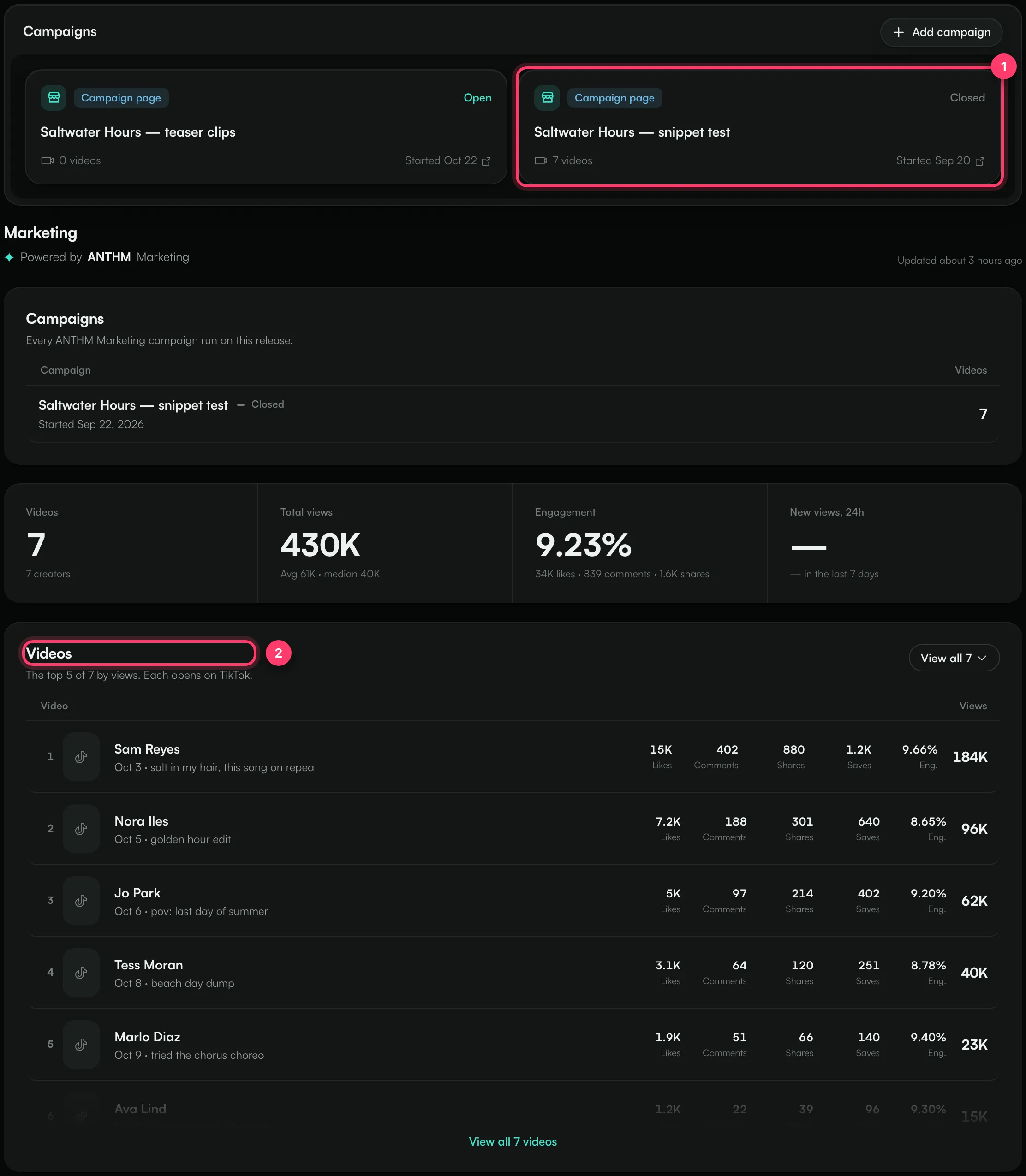
The cards at the top list each campaign, its status and how many videos it has. Under Marketing you'll find:
- The number of videos and creators, total views, engagement (likes, comments and shares per view) and new views in the last 24 hours.
- Videos: the top five videos by views. Click View all to see every campaign video and sort by Views, Newest or Engagement. Each video opens on TikTok.
- Performance: campaign views, the campaign sound and your streams on one chart. It fills in once a couple of days of readings are in.
- Focus sound: how many videos use the campaign's TikTok sound. This counts every video on the sound, not only campaign videos.
- Streaming since the campaign started: streams a day before and after the first campaign video.
- Top-performing creators: creators ranked by views on their campaign videos.
Video numbers refresh several times a day. Streams follow each store's own reporting delay. View counts are read from the posted video itself, not from screenshots.
To show these numbers to an artist or their team without giving them access to your account, see "Share campaign status with your team".
Deadlines
A creator has a set number of days to deliver after they're accepted. They get a reminder before the deadline. If the video still hasn't arrived after a grace period, the claim is cancelled, the slot opens again and the reserved pay goes back to the campaign.
Common questions
Can I approve or reject a video myself?
On campaigns from the Campaigns page and Ignite, approvals are done by your ANTHM manager. If a video doesn't fit your brief, or you want something changed, send us a message and we'll ask the creator for a revision before anything is paid.
Is a creator paid if their video isn't approved?
No. Only approved videos are paid. The money reserved for a claim that's cancelled or not accepted goes back to the campaign.
A video was deleted after it was approved. What happens?
Its views up to that point still count in the numbers. If you think a creator didn't keep to the brief, contact us.
What happens to money that's left when the campaign ends?
When the campaign is closed, anything it didn't spend becomes account credit. See "Account credit and refunds".
Questions about a creator or a video?
Send us a message from the chat on this page, or email team@ammdistro.com.
Related: Fund and publish a campaign · Account credit and refunds · Share campaign status with your team · Collabs: work with creators directly · Track how your sound is used on TikTok
Updated on: 23/10/2026
Thank you!