Billing and your subscription
Your ANTHM plan decides which tools your account can use and your daily limits, such as Pulse scans and team members. You can see your plan in Settings under ANTHM Service, and manage payment from there. Studio levels are billed separately; see "Studio plans and limits".
See your plan
Open Settings from the menu under your name at the bottom of the left menu, and scroll to ANTHM Service.
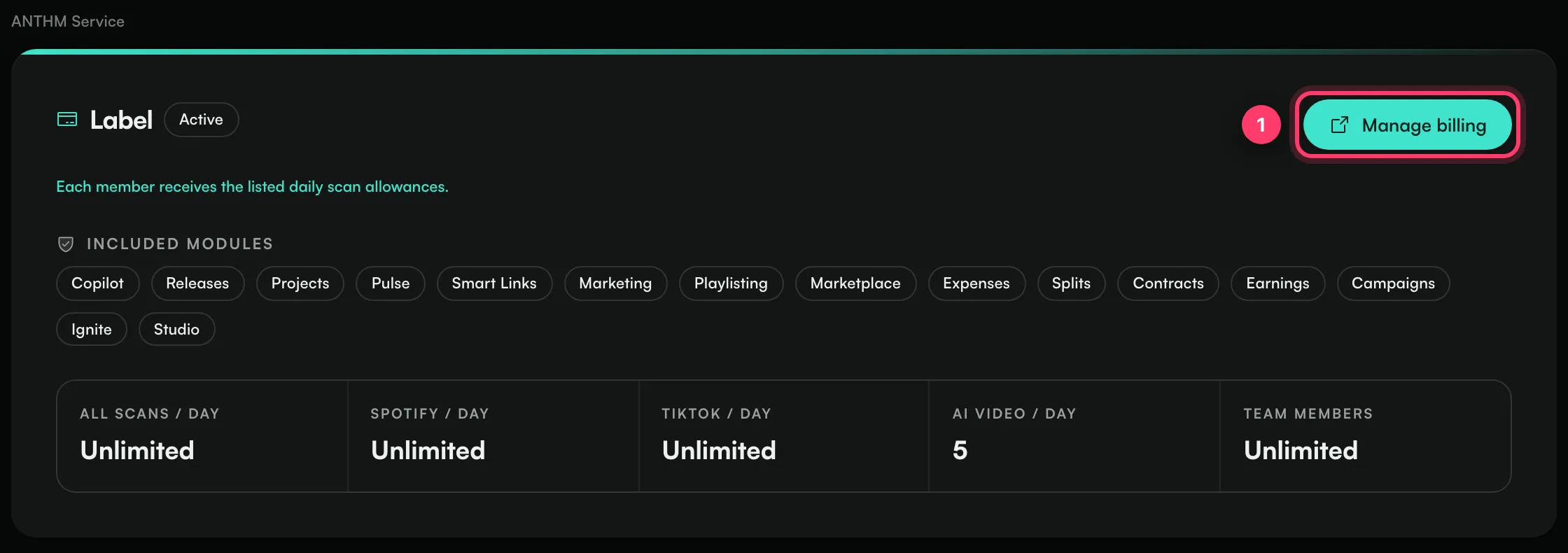
- The plan name and its status, for example Active.
- The price, or "Complimentary access" if your plan is provided at no charge.
- Whether daily scan allowances are shared across the account or given to each member.
- Included modules: the tools your plan includes, such as Pulse, Studio, Smart Links, Marketing, Campaigns, Ignite and Copilot.
- Your limits: All scans / day, Spotify / day, TikTok / day, AI video / day and Team members. "Unlimited" means there's no limit.
Daily Pulse limits reset at midnight UTC.
Manage billing
- In ANTHM Service, click Manage billing (or Set up billing if payment isn't set up yet).
- A secure billing page opens. There you can update your card, see your invoices, or cancel.
Only account admins can manage billing. Other team members see "Only account administrators can manage billing". If your plan is complimentary, there's no billing button.
Choose a plan
If your account has no plan yet, ANTHM Service shows the plans available to you, with what each includes. Click Choose plan and pay on the secure checkout page.
ANTHM is invite-only. If you don't see a plan that fits, contact us.
If a payment fails or you cancel
Your plan's tools stay on while the plan is active, complimentary or in a trial that hasn't ended. If a payment fails or the plan is paused or cancelled, the tools it includes are switched off until it's active again.
To fix a failed payment, click Manage billing and update your card.
Other charges
- Studio: Pro and Unlimited Studio levels are a separate monthly add-on, unless your plan includes them. See "Studio plans and limits".
- Creator campaigns: you fund each campaign before you publish it, and the checkout shows a service fee. See "Fund and publish a campaign".
Common questions
Where do I find my invoices?
Click Manage billing. Your invoices are on the billing page.
Why can't I see Drops, Fans or Email?
Those tools come with plans that include marketing. Check Included modules in ANTHM Service, and contact us to change your plan.
Need help with billing?
Send us a message from the chat on this page, or email team@ammdistro.com.
Related: Studio plans and limits · Fund and publish a campaign · Team members and roles
Updated on: 23/10/2026
Thank you!