Notifications
ANTHM lets you know in the app when something needs you or has happened: a drop passes a signup milestone, a creator sends a draft or a live post, an email finishes sending, someone sends you a track, or a campaign changes. Your notifications are in your inbox.
Open your inbox
Click the bell at the top right of any page. A dot on the bell means you have unread notifications. You can also open Notifications from the menu under your name at the bottom of the left menu.
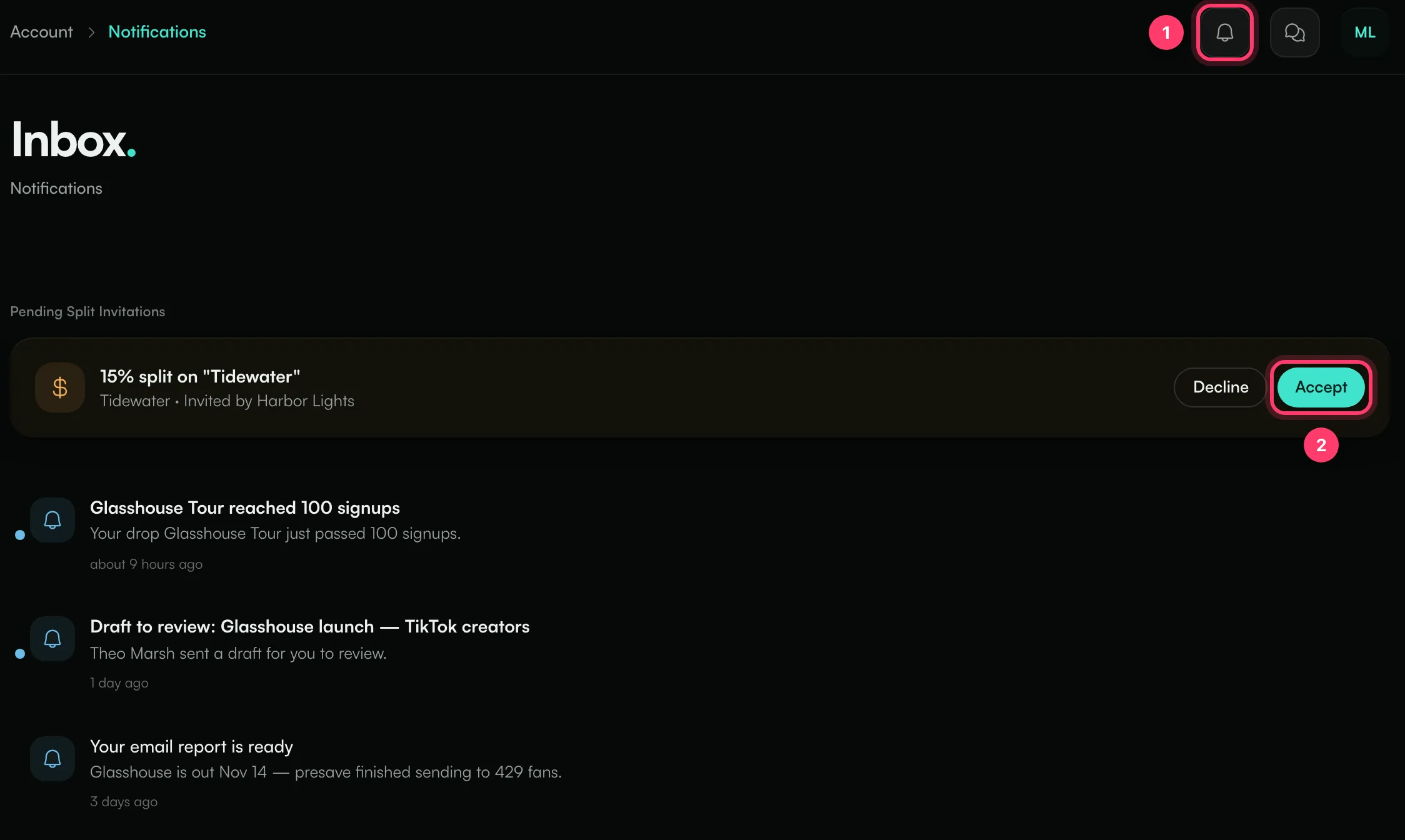
- The bell opens your inbox.
- Pending Split Invitations at the top: someone invited you to a share of a song's earnings. Click Accept or Decline.
Below that are your notifications, newest first, with a dot on unread ones. Hover over a notification and click the check to mark it as read, or click Mark all read at the top. The inbox shows your latest 50.
If there's nothing new, you'll see "All caught up".
What you're notified about
- Drops: when a drop reaches 1, 10, 25, 50, 100, 250, 500 and 1,000 signups, and so on.
- Collabs: when a creator sends a draft to review or a live post.
- Email: when an email finishes sending and its report is ready.
- Sharing: when someone sends a track to your inbox.
- Campaigns: updates on creators and deadlines.
- Splits: invitations to a share of a song's earnings.
If you also use AMM Distro, notifications about your releases may appear here too, because both apps use the same account.
On your phone
If you have the ANTHM app, you can turn on push notifications for the same events. See "ANTHM mobile app".
Common questions
Can I turn off certain notifications?
There are no notification settings in ANTHM on the web. In the ANTHM app you can turn push notifications on or off. To ask about the emails you get, contact us.
Need help?
Send us a message from the chat on this page, or email team@ammdistro.com.
Related: ANTHM mobile app · Team members and roles
Updated on: 23/10/2026
Thank you!