Switch between accounts
If you belong to more than one AMM Distro account, for example your own artist account and a label's account, you use one login and switch between them. Everything you see, including releases, analytics, money and settings, belongs to the account that's selected.
Switch accounts on the web
- Click the account card at the top of the sidebar. It shows the name of the account you're in.
- Under Accounts, pick the account you want.
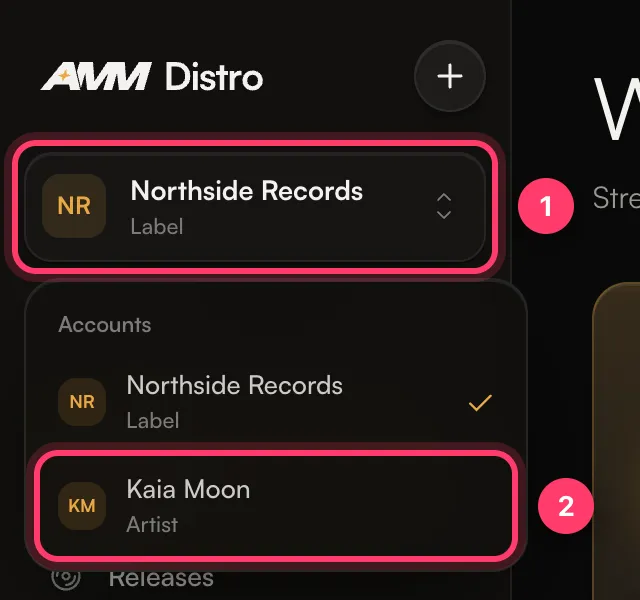
A short message confirms the switch ("Switched to …"). You stay on the same page if it makes sense for the new account. If you were on a page that belongs to the previous account, such as a single release, you're taken to the matching list instead.
Under each account name you'll see its type, such as Artist or Label. An artist account that releases under a label shows Sub-account · under and the label's name.
Switch accounts in the mobile app
If you have the AMM Distro app, you can switch accounts there too. The app keeps showing the account you picked until you switch again.
Common questions
I don't see an account I expected
You only see accounts you've been added to. Ask an Admin of that account to invite you from Settings → Team Members, using the email you sign in with. If you were invited, check that you accepted the invitation from the email.
Why do my releases or earnings look different after switching?
Each account has its own releases, balance, statements and payout settings. Switch back to the other account to see its numbers.
I changed a setting. Did it apply to all my accounts?
Account settings, like team members, artists and payout details, apply only to the account that was selected. Your name and email notification choices are personal to you.
I see "Couldn't switch accounts. Please try again."
Refresh the page and try again. If it keeps happening, contact support.
Related: Add team members and choose their role · Manage artists on your label (sub-accounts) · The AMM Distro mobile app
Updated on: 23/10/2026
Thank you!