A tour of your dashboard
When you sign in, you land on Home. It shows your next release, your recent catalog, how your music is doing, and anything that needs you. The left menu takes you everywhere else.
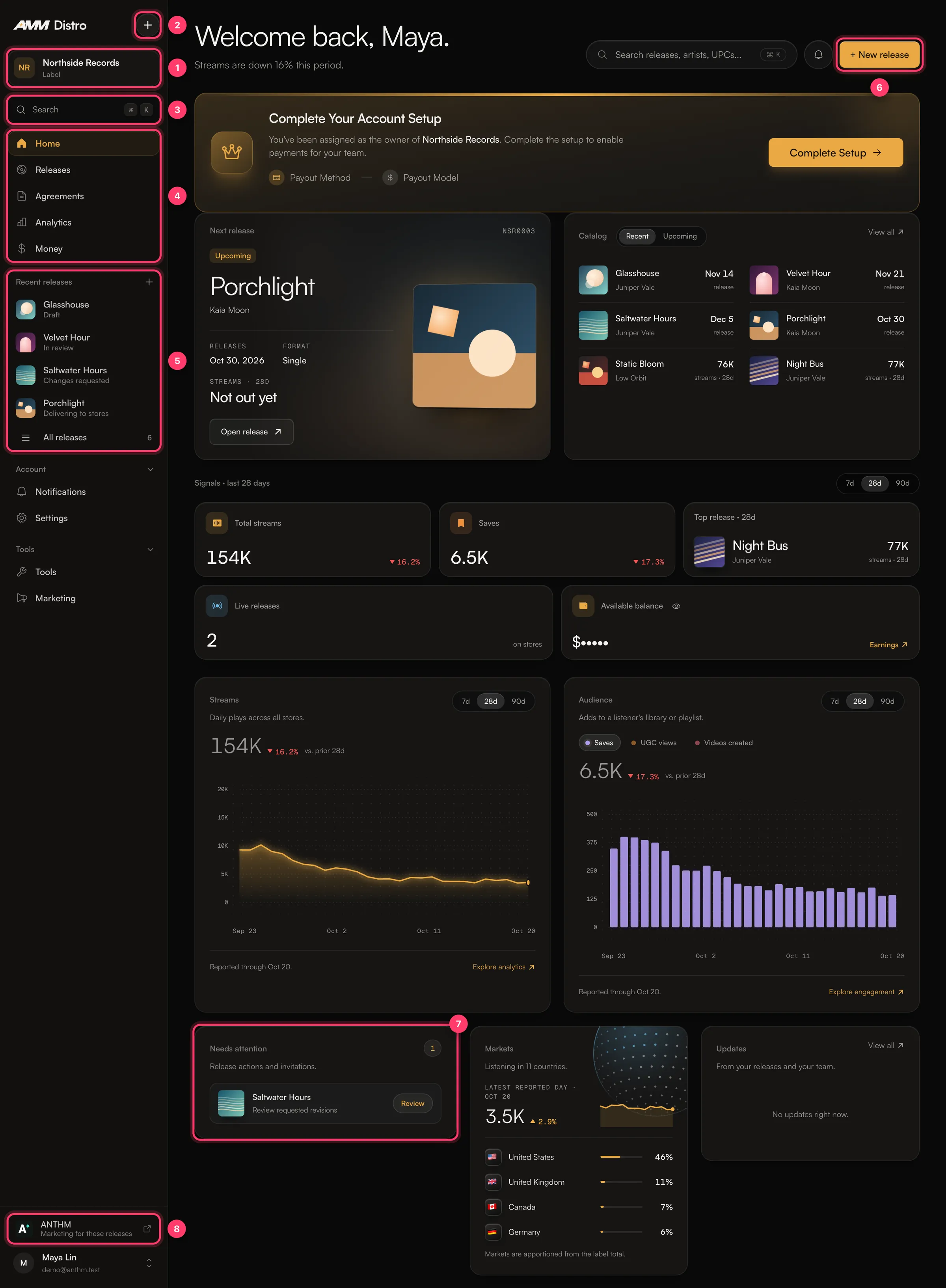
1. Account switcher
The card at the top of the left menu shows the account you're working in, such as your artist name or your label. If you belong to more than one account (for example your own and a label's), click the card and pick another account. Everything you see changes to that account.
2. The + menu
Click + to start something new:
- New release: a single, EP or album.
- Import a release: move a release in from another distributor.
- Smart link: an anthm.link page with a Spotify pre-save.
3. Search
Click Search or press ⌘K (Ctrl+K on Windows) to jump to any release, artist or page. You can search releases by title, artist or UPC.
4. Main menu
Item | What it's for |
|---|---|
Home | Your overview. |
Releases | Every release on the account, with its status. Filter by title, artist, UPC or status. |
Agreements | Release agreements and collaborator agreements, sorted into Awaiting your signature, Signed and Archived. |
Analytics | Streams and listeners from the stores, plus a separate Spotify tab with Spotify for Artists data, and an Earnings tab. |
Money | Your balance, statements, payout method, tax form and transactions. |
Below that, Account has Notifications and Settings, and Tools has Tools (including Catalog Transfer) and Marketing.
5. Recent releases
Your latest releases with a short status line, such as "Draft", "In review", "Changes requested" or "Delivering to stores". Click one to open it, or click All releases.
6. New release
The New release button at the top of Home does the same as + → New release. It opens the release builder.
7. Needs attention
Things waiting on you, such as:
- Review requested revisions on a release we sent back.
- Sign your release agreement after a release is approved.
- Review your split invitations when someone shares royalties with you.
- Upload requested project files when your label asks for stems or project files.
Click Review (or the item) to go straight to it.
8. ANTHM
Opens ANTHM, our marketing platform for creator campaigns. It uses the same sign-in. You don't have to use it.
The rest of Home
- Next release: your next upcoming release, with its date and format.
- Catalog: your recent and upcoming releases.
- Signals: total streams, saves, live releases, your top release and your available balance for the last 7, 28 or 90 days. Click the eye icon to show or hide the balance.
- Streams and Audience charts, with Reported through showing the last day the stores have reported. Store data is a few days behind.
- Markets: the countries where people listen most.
- Updates: news from your releases and your team.
If you're the owner of a new account, you may also see Complete Your Account Setup. Click Complete Setup to add a payout method so you can be paid.
Common questions
Why is my streams chart empty?
Numbers appear once a release is live and the stores have reported. Store reports arrive daily, a few days behind.
I can't see a release I know exists.
Check the account switcher. The release may be on another account you belong to.
Some menu items are missing.
What you see depends on your role. Viewers can't make changes, and accounts that only receive royalty splits see earnings, payouts, notifications and settings.
Related: Create a release, step by step · Release statuses explained · Accept an invitation · Sign in to AMM Distro
Updated on: 23/10/2026
Thank you!