Read a TikTok sound scan
A TikTok sound scan shows how many videos use a sound, whether that number is growing, who is posting and what kind of videos they make. This article explains each section, including the stage badges like Emerging and Peaking.
The sound card
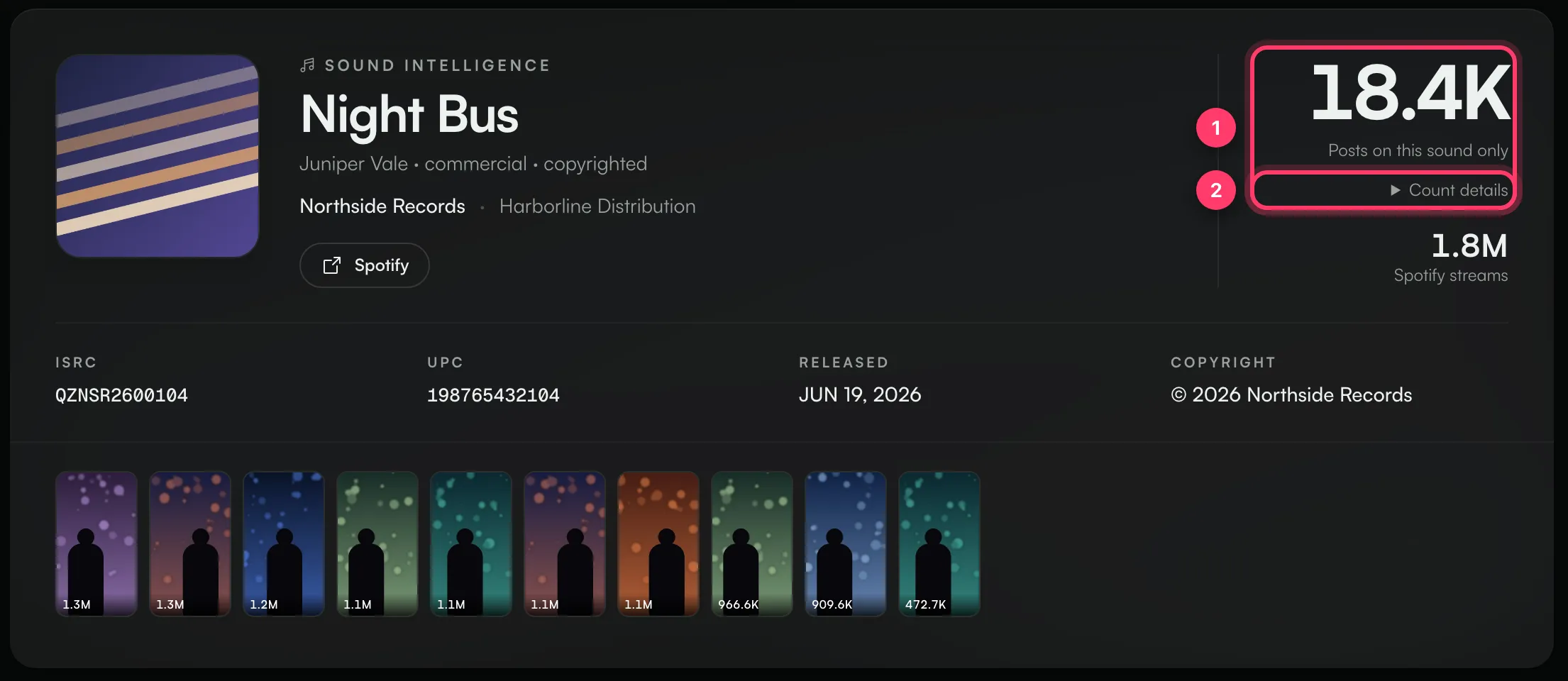
- Sound Intelligence shows the sound's title and artist, the label and distributor of the linked song when TikTok links it to a release, and a Spotify button.
- The big number is how many videos use the sound.
- Posts on this sound only counts videos on this one sound.
- Some songs have several sounds on TikTok, for example the official sound, a sped-up version and re-uploads. When Pulse knows about those, you can switch between Merged (videos across the linked sounds) and This sound.
- Count details shows where the number comes from, including how many videos were sampled for the rest of the scan. The sample is not the total.
- Spotify streams is the linked song's Spotify play count, when there is one.
- Below that you'll find the ISRC, UPC, release date and copyright of the linked song, and a strip of the top videos.
Trend Trajectory and stage badges

Pulse checks the video count of sounds it knows about every day. Trend Trajectory charts that count over time, next to the linked song's Spotify streams per day, so you can see whether a TikTok rise is followed by streams. Use the menu above the chart to switch between the individual sound and the combined total. Viewing it doesn't use a scan credit.
The badge in the corner shows the sound's stage:
Badge | What it means |
|---|---|
Emerging | Early growth. New videos are starting to appear. |
Accelerating | New videos are being made faster each day. |
Peaking | Still a lot of new videos, but the pace has levelled off. |
Declining | Fewer new videos each day than before. |
Dormant | Few or no new videos. |
Unknown | Not enough history yet to say. |
The marker under the title (high, medium or low confidence) shows how much history the stage is based on. A sound Pulse has only just started tracking will have low confidence.
Below the chart:
- Group net growth / 24h: new videos across the sound's group in the last day.
- Group velocity / day: the average number of new videos per day.
- Last group count: the latest total.
If the sound is new to Pulse, Trend Trajectory may not appear yet. It fills in as daily checks build up.
The other sections
- Videos using this recording: a list of videos you can search by creator, caption or video ID. Click Load merged feed to include videos from the song's other sounds when they're available.
- Genre & Trend Signal: hashtags used with the sound, weighted by reach. Bigger tags carry more of the sound's views.
- Spotify Streaming: the linked song's typical streams per day and its trend.
- Who's Posting: how many sampled videos come from creators of each size, from Nano (under 10K followers) to Mega (10M+).
- Engagement Quality: the median likes, comments and shares per view in the sample, plus the top 10%.
- AI Video Analysis: what the top videos show and why they work, if your plan includes it. See "AI video analysis".
- Top Videos and Top Creators: the most-viewed videos and the creators behind them.
- Markets and Credits: where the linked song can be played and who's credited.
- Where It Lives: the languages of the videos in the sample.
Common questions
Why is the number lower than TikTok shows?
TikTok's app can add up videos across all versions of a song. Posts on this sound only counts one sound. Switch to Merged when it's offered, or open Count details to see what's included.
Does reopening a TikTok scan use a credit?
No. Opening a saved scan is free. Clicking Run fresh scan uses a TikTok scan.
Related: Scan a Spotify or TikTok link · AI video analysis · Search TikTok sounds · Daily scan limits
Updated on: 23/10/2026
Thank you!