Scan a Spotify or TikTok link
Pulse shows the data behind a song. Paste a Spotify link or a TikTok sound or video link and click Search. Pulse shows who distributes the song, its identifiers, credits and streams, or, for a TikTok sound, how many videos use it and whether it's growing.
Run a scan
- In the left menu, click Pulse.
- Paste a link into the box that says "Spotify track / artist, or a TikTok sound or video link…".
- Click Search.
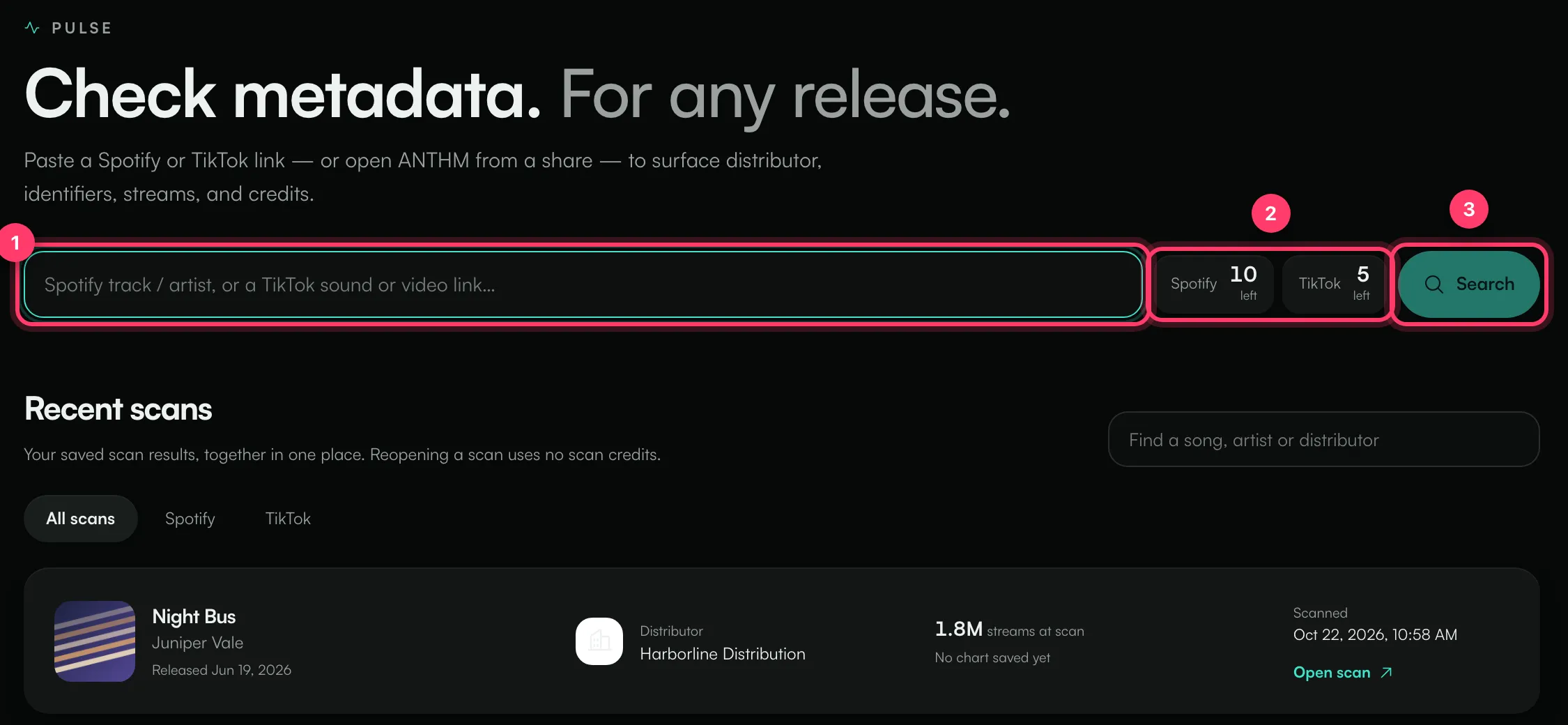
A Spotify scan usually takes a few seconds. A TikTok scan takes longer, often 20 to 40 seconds, because Pulse reads the videos that use the sound. Keep the page open while it runs.
The counters next to the box show how many Spotify and TikTok scans you have left today. Each new scan uses one. See "Daily scan limits".
Links you can scan
Link | What you get |
|---|---|
Spotify track | Distributor, label, release date, ISRC and UPC, copyright lines, credits, streams, countries where it plays, other releases of the same recording, and TikTok sounds linked to it |
Spotify artist, album or playlist | The main distributor and a breakdown of distributors across the tracks |
TikTok sound | How many videos use the sound, how fast that's changing, top videos and creators, hashtags, languages and the linked song details |
TikTok video | The video's details and the sound it uses (click Scan sound to scan that sound), plus AI analysis of the video if your plan includes it |
To get a link: in Spotify, click Share then Copy link. On TikTok, open the sound or video, tap Share, then Copy link.
Your saved scans
Every scan is saved. Under Recent scans on the Pulse page you'll find your last 15, with tabs for All scans, Spotify and TikTok and a box to find a song, artist or distributor. Click Open scan to see the result again. Reopening a scan uses no scan credits.
A saved scan shows "Saved scan from" and the date at the top. To get the latest numbers, click Run fresh scan. This uses a scan.
Each saved scan has its own web address, so you can bookmark it. To show it to someone without an ANTHM account, see "Share a scan".
To start over with a new link, click New.
If a scan doesn't work
Message | What to do |
|---|---|
No Spotify scans left today / No TikTok scans left today | You've used today's allowance. It resets at midnight UTC. |
Daily scan quota exhausted. Resets at UTC midnight. | You have no scans left of either type today. |
Pulse isn't included in your plan. | Your plan doesn't include Pulse. Contact us to add it. |
If a scan fails for another reason, check that the link is public and complete, then try again.
Common questions
Can I scan songs that aren't mine?
Yes. Pulse works on any public Spotify or TikTok link.
Why does the TikTok count differ from what I see in the TikTok app?
Pulse counts videos on that one sound ID. The same song often has several sounds on TikTok (sped-up versions, re-uploads, different releases). See "Read a TikTok sound scan".
Related: Read a Spotify track scan · Read a TikTok sound scan · Daily scan limits · Share a scan
Updated on: 23/10/2026
Thank you!