Drops: collect fans for a release, show or tour
A drop is a signup page at anthm.link/d/your-page where fans leave their email: for your mailing list, a show, a tour, or an early listen of a song before it comes out. Everyone who signs up joins your fan list in Fans.
Open Drops under Audience in the left menu. Drops are available on plans that include the marketing tools.
Choose the kind of drop
Kind | What it's for |
|---|---|
Mailing list | Collect emails from fans who want to hear about new music and shows. |
Event | One show or listening party: date, venue, a countdown, and a message after signup. |
Tour | Every tour date with ticket links. Fans sign up for presale alerts for their city. |
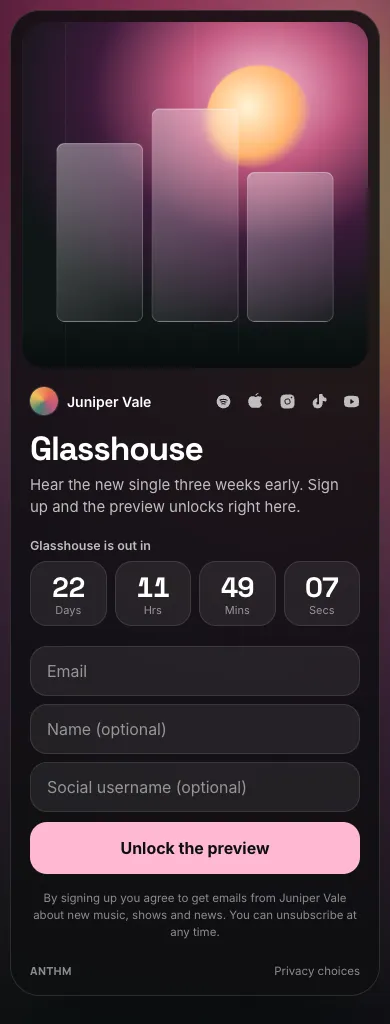
Pre-release | Promote an unreleased song. Fans who sign up get a preview clip or a link. |
Create a drop
- Click New drop.
- Pick the kind.
- Enter the Artist and, optionally, a Title.
- Click Create drop.
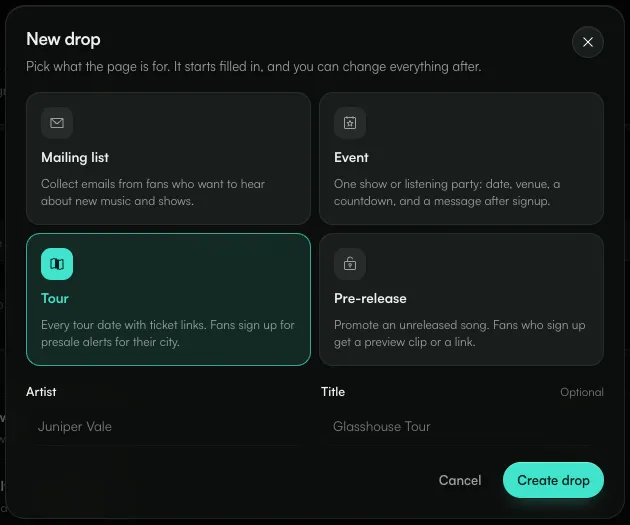
The drop starts as a Draft, already filled in from a template for that kind. Change anything you like; your changes save automatically. The preview on the right shows the Signup form and what fans see After signup.

- Draft, Live and Closed set whether fans can open the page and sign up.
- Share gives you the link and a QR code.
- The tabs: Content, Design, Form & confirmation, Stats and Signups.
Content
- Page: the kind, Artist, Title and a Subtitle that says what fans get for signing up.
- Artwork: Cover art (square, at least 1000 px; also used for the blurred background) and an Artist photo.
- Event: the date and time, Venue, City and an optional Address, plus an optional countdown.
- Tour dates: add each date with its City, Venue, a ticket link and a ticket status: On sale, Soon or Sold out. Dates that have a ticket link and are On sale show a Tickets button. Fans pick a date and sign up for alerts for that show.
- Release and Reward (pre-release): the release date, an optional countdown, and what fans unlock after signing up: a Preview clip (MP3, M4A or WAV) they can play on the page, and/or a Reward link with its own button label. The reward is also shown in the confirmation email.
- Artist links: icons under the cover for Spotify, Apple Music, YouTube, Instagram, TikTok, X, SoundCloud, Bandcamp or a website.
- Address and schedule: the Page address (anthm.link/d/…; lowercase letters, numbers and dashes), optional Signups open and Signups close times, and Tags for new fans. Everyone who signs up on this drop gets these tags in Fans.
Design
Start from a look (Cover glow, Crimson, Midnight, Paper, Poster or Lagoon), then set the Background (Blurred cover, Colour or Gradient), the Card style (Dark, Light or Glass), the corners, the cover framing, the Button colour and the Title font.
Form & confirmation
- Form: Email is always required. Name, Social username and Country can each be Off, Optional or Required. You can change the Button label and the Consent line shown under the button.
- After signup: the heading, message and an optional button (for example "Pre-save on Spotify").
- Confirmation email: turn on Email fans when they sign up and write the subject and body. Click Send a test to send it to yourself first. The email comes from the artist name and includes an unsubscribe link. For pre-release drops it includes the preview clip and reward link.
The confirmation email is sent once, the first time a fan signs up to that drop, and only if they're subscribed.
Publish and share
- Set the switch at the top to Live.
- Click Share.
- Copy the link, or download the QR code as PNG for print or SVG for design files.
Under Tag the link by where you post it, pick instagram, tiktok, x or newsletter before copying. Signups from a tagged link show under that source in Stats, so you can see which posts brought people in. The QR code uses the same tag.
If you set Signups open, the page shows the opening time and a countdown until then. To stop signups, set the drop to Closed: the page stays up and says "Signups for this page have closed."
Stats and signups
- Stats: Views, Unique visitors, Signups and Signup rate with a daily chart, plus signups by show (tours), source, tagged link, city and country.
- Signups: everyone who signed up, with their show, source, location and time. Search by email, name or handle, and on tours filter by show.
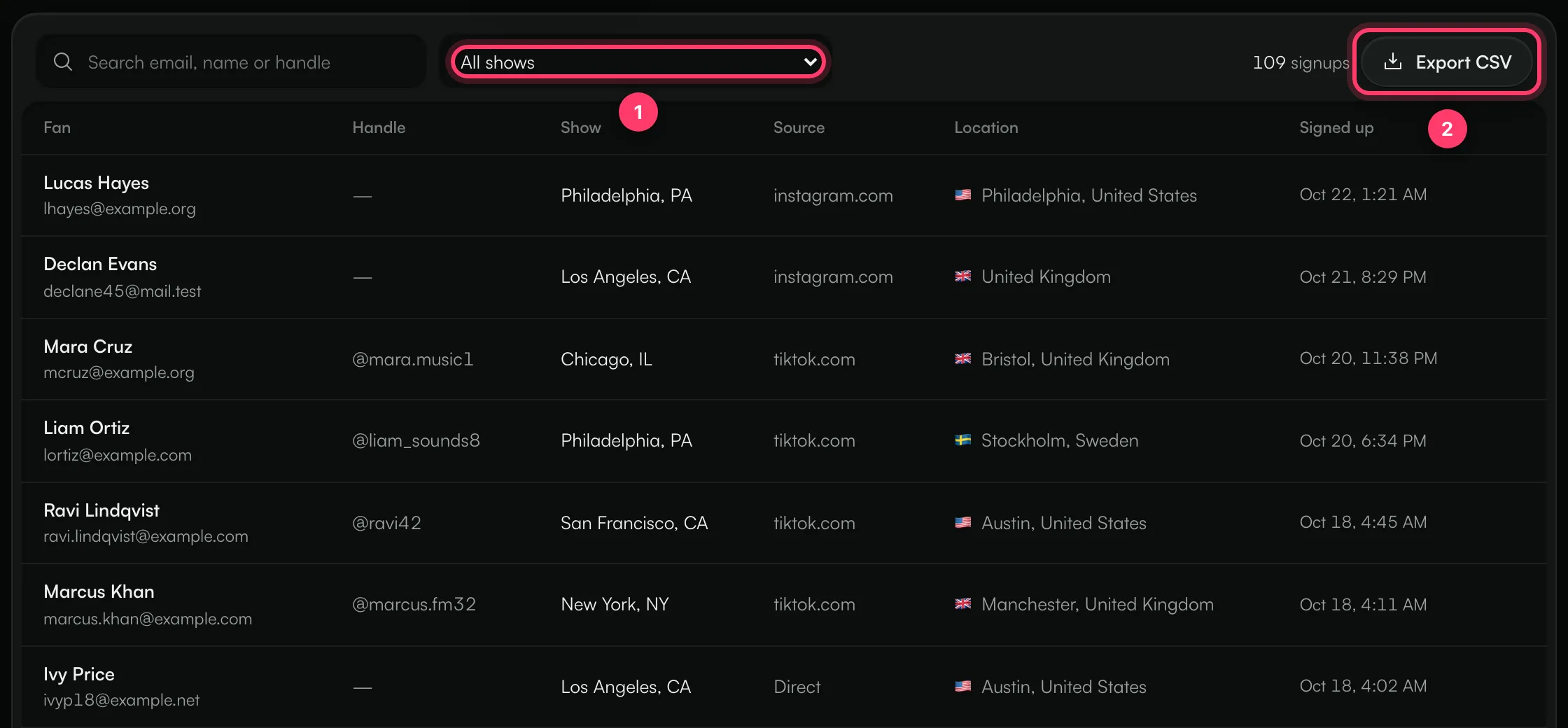
- Filter by show on a tour.
- Export CSV downloads the signups that match your search and filter.
To remove someone from a drop, use the remove button on their row and confirm. They stay on your fan list.
You also get a notification in ANTHM when a drop reaches signup milestones: 1, 10, 25, 50, 100 signups and so on.
Other actions
From the … menu at the top of a drop:
- Duplicate makes a draft copy with a new address.
- Delete takes the page down and removes its stats. Fans who signed up stay on your fan list.
Common questions
Fans see a page that isn't there.
The drop is still a Draft. Set it to Live.
A fan signed up twice. Are they on my list twice?
No. Each email address is one fan. A second signup is shown as "You're already signed up" and adds to that fan's history.
A fan unsubscribed earlier and signed up again.
They stay unsubscribed. Signing up again doesn't resubscribe them, so they won't get your emails. Only the fan can subscribe again, from the unsubscribe link in any email you sent them.
Can I collect phone numbers?
No. Drops collect email addresses only.
Need help?
Send us a message from the chat on this page, or email team@ammdistro.com.
Related: Fans: your fan list · Email your fans · Link in bio · Smart links and pre-saves
Updated on: 23/10/2026
Thank you!