Smart links for your releases
Every release gets a free smart link: one anthm.link page that lists your release on every store, with a Spotify pre-save before release day. We create it for you when your release is approved, so most of the time there's nothing to set up.
Find your links
Go to Marketing in the sidebar and open Promo Links. Each release's link is listed with its URL, its status and its views and clicks.
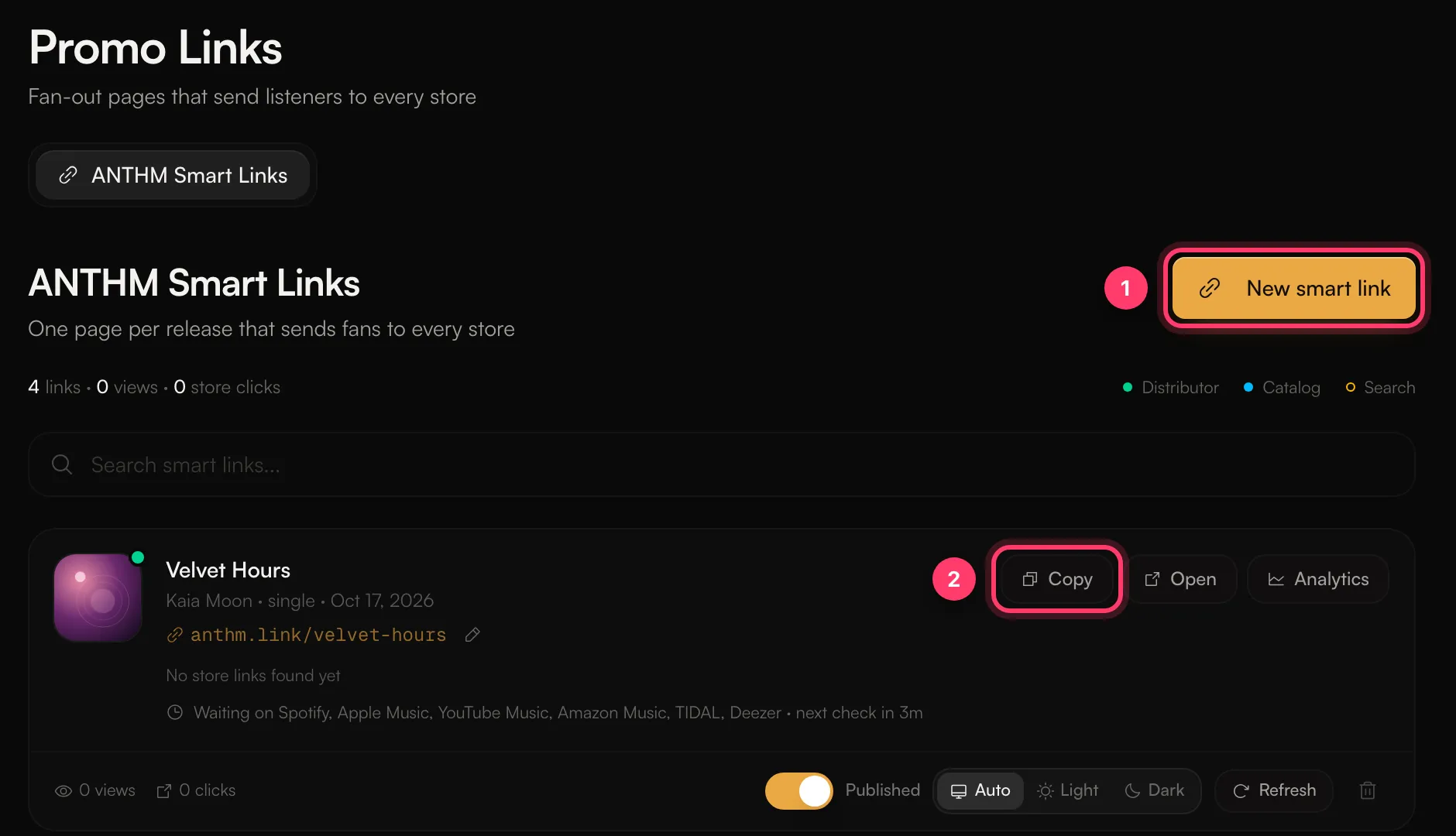
- Click Copy to copy the link, or Open to see the page as fans see it.
- Click Analytics to see visitors, store clicks and where they came from.
Before and after release day
Before release day, the page leads with a Spotify pre-save and lists the other stores as coming soon. Once the release is out, the store buttons fill in as each store's link is found. If a link shows "No store links found yet", it's still waiting on the stores and checks again on its own. Click Refresh to check now.
Make your own link
Click New smart link, or use the + button at the top of the sidebar and choose Smart link. You can make one from a release or from a UPC.
Change the URL
You can change an automatic link's URL once. Click the pencil next to the URL. The old URL stops working, so change it before you share the link widely.
For the full guide to smart link pages, pre-saves, themes and link analytics, see Smart links and pre-saves in the ANTHM section.
Related: Smart links and pre-saves · Marketing tools in AMM Distro · Read your analytics
Updated on: 23/10/2026
Thank you!