Copyright claims and counter-notices
If someone files a copyright notice against one of your releases, we open a case on the DMCA cases page and email the account's admins and owner. You respond there: either agree to the takedown, or contest the claim with evidence. If we approve it, you can then file a formal counter-notice.
What happens when a notice arrives
- We email the account's owner and admins.
- The account gets a strike, and account activity is usually frozen while the case is open. You can still view everything and respond to the claim, but other changes are blocked.
- A banner at the top of the app shows your standing, for example "1 out of 2 strikes", with a link to Review DMCA cases.
- The affected release shows a Copyright notice box and a DMCA · response & evidence tab.
Respond to a claim
Only the account's owner and admins can respond.
- Open DMCA cases from the banner or the release. Pick the case on the left.
- Read the claim: who filed it, the claim type, the territory and the products named. Open Complete original notice to read it in full.
- Decide how to respond:
- If the claim is right, for example a sample wasn't cleared, explain what went wrong in the text box and click Yes, I consent to takedown.
- If the claim is wrong, upload your evidence, explain why you contest it, and click I contest this claim.
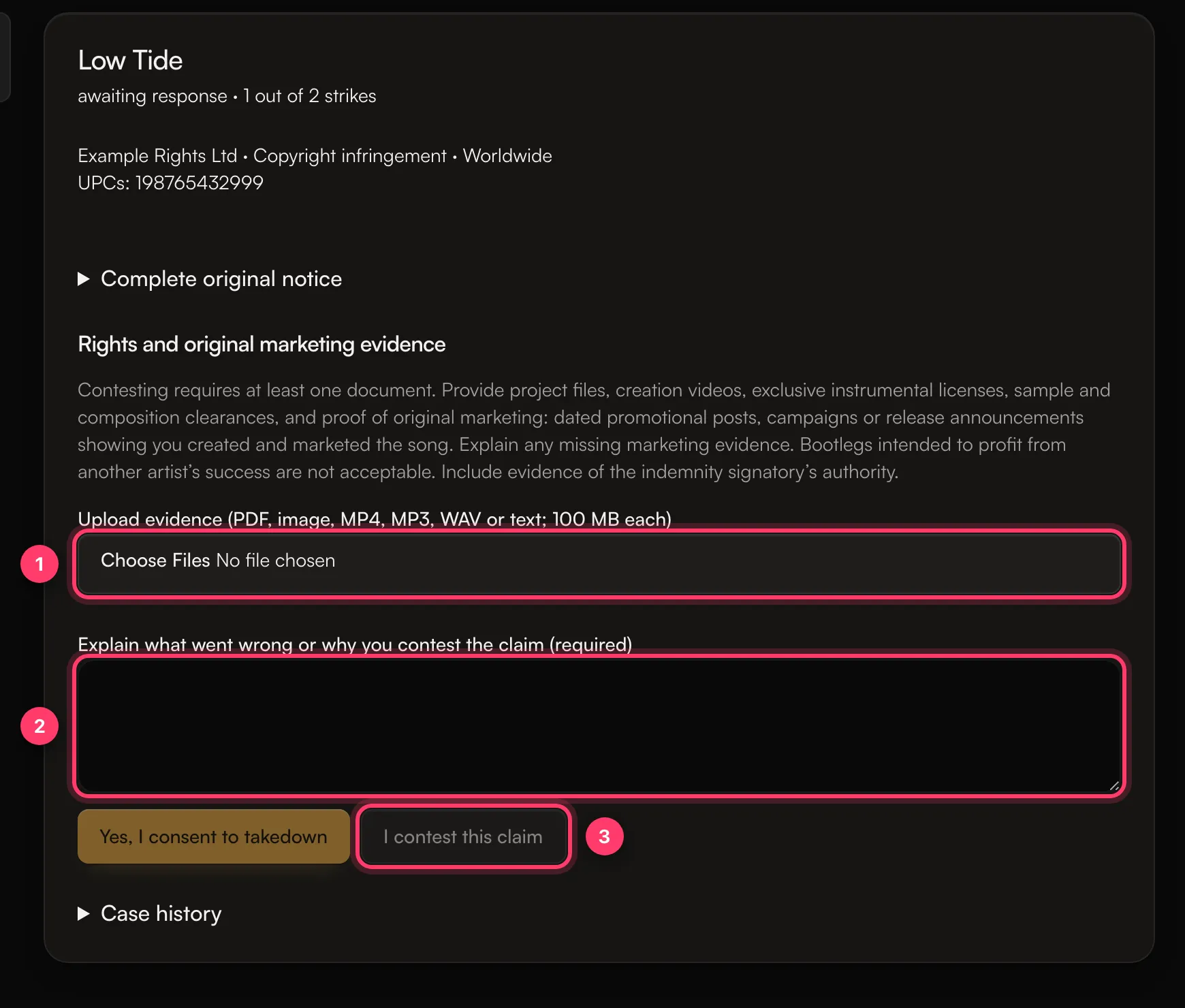
Your explanation must be at least 20 characters. To contest, you must upload at least one document first.
Evidence that helps
Upload PDFs, images, MP4, MP3, WAV or text files, up to 100 MB each. The page asks for:
- Project files and videos of you making the song
- Exclusive licenses for instrumentals or beats
- Sample and composition clearances
- Proof of original marketing: dated promotional posts, campaigns or release announcements showing you created and marketed the song
Explain any missing marketing evidence. Bootlegs intended to profit from another artist's success are not acceptable.
Counter-notices
After you contest, our team reviews your evidence. If we allow a counter-notice, a Counter-notification and indemnity form appears on the case.
A counter-notice is a formal legal step. It significantly escalates the dispute and can lead to a lawsuit. Submit one only if you can document your rights and are prepared to defend them in court.
The form asks for:
- The copyright owner's full legal name, company name, address, country, email and phone
- Every release, track, artist name, UPC and ISRC in the claim, and where the content was before removal (a link or Spotify URI)
- Why the claim is mistaken
- Your authority to sign for the company
- Your electronic signature: your full legal name, typed exactly as above
You also confirm statements about ownership, an indemnity, consent to court jurisdiction, and a statement under penalty of perjury. The copyright owner must complete and sign it personally. Click Sign and submit to admin for review. Our team reviews it before anything is sent, and you can download a copy of the signed records.
Submitting a counter-notice doesn't put your release back in stores automatically.
How a case ends
Our team can resolve a case, remove a strike, lift a freeze, or confirm a takedown, depending on the outcome. The case page shows its current state, and Case history lists every step.
Common questions
My own song got a claim from someone I don't know
Contest it with your evidence: project files, your original upload dates and your marketing. If a beat or sample is involved, include your license.
I used a sample I didn't clear
Consent to the takedown and explain. We can help you look at clearing it or other ways to release the song. See Samples, covers and permissions.
I got a Content ID claim on my own YouTube video
That's a different process from a copyright notice against your release. Contact support with the video link.
Related: Why is my account suspended, under review or frozen? · Samples, covers and permissions · Who owns my music? · Contact support
Updated on: 23/10/2026
Thank you!