What Copilot does
Copilot is an assistant in ANTHM that knows your releases. It reads your TikTok sound data and your AMM Distro catalog, answers questions about how your songs are doing, suggests videos to make, checks TikTok posts, and prepares claims on TikTok sounds that use your music. Anything that leaves ANTHM, such as filing a claim, waits for your approval.
Open Copilot under Apps in the left menu. Copilot is available on plans that include it. If you see "Copilot isn't on for this account yet", it isn't part of your plan; contact us to ask about it.
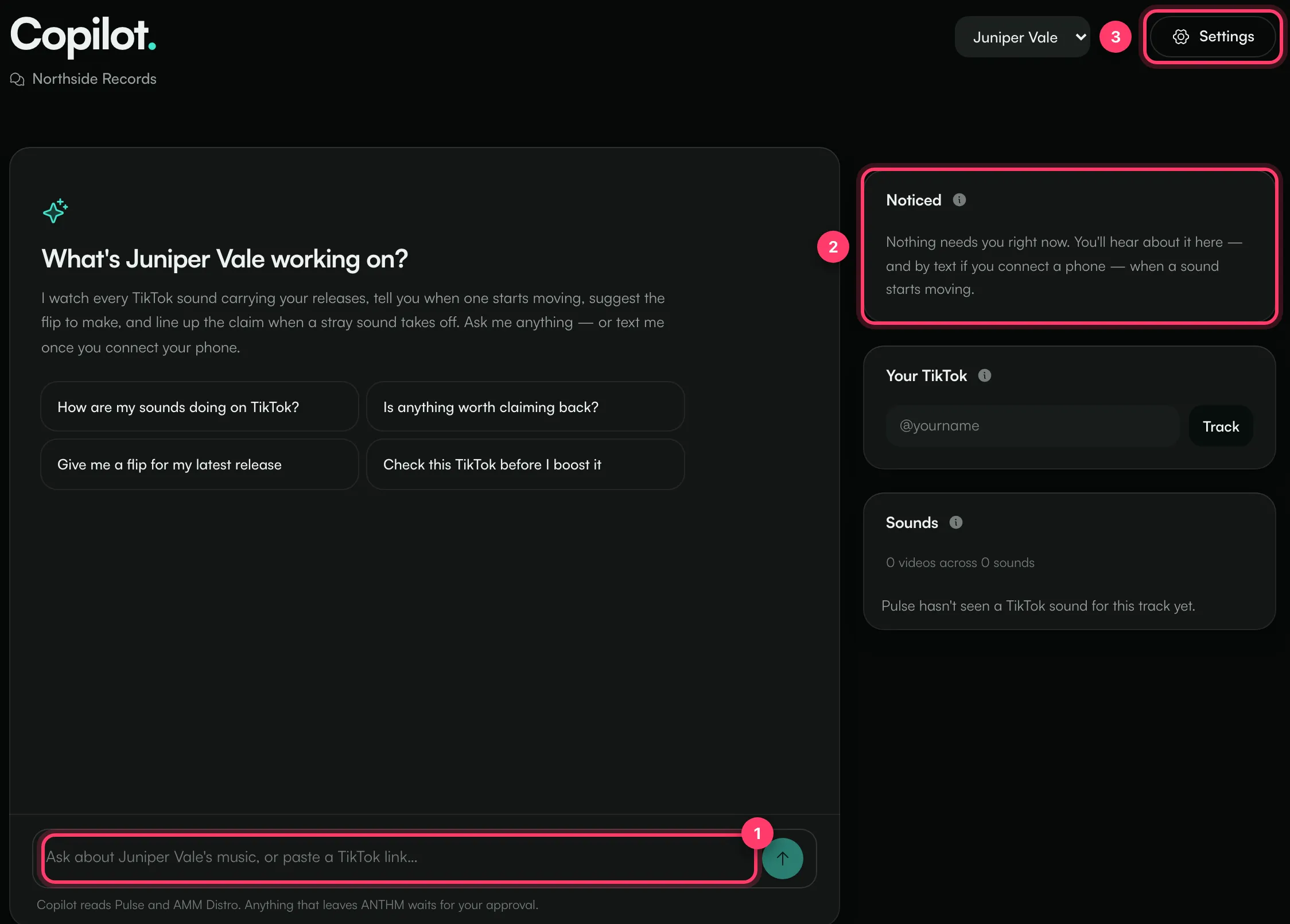
- Ask Copilot anything in the message box, or paste a TikTok link.
- Noticed, Your TikTok and Sounds show what Copilot is watching.
- Settings controls what Copilot remembers about you.
Get started
The first time you open Copilot, it asks "What name do you release music under?". Enter your artist name and click Start. If your account has more than one artist, pick one from the artist menu at the top. Each conversation is about one artist. Click + to start a new conversation.
To get going, click one of the suggestions:
- "How are my sounds doing on TikTok?"
- "Is anything worth claiming back?"
- "Give me a flip for my latest release"
- "Check this TikTok before I boost it" (then paste the TikTok link)
Press Enter to send, or Shift+Enter for a new line.
What Copilot can do
- Report on your sounds: every TikTok sound that carries your releases, how many videos use each one, and how they've moved over the last two weeks.
- Suggest flips: ideas for videos to make on a release, with captions to test. Tap a caption to copy it, or open Studio to make the video.
- Check a post before you boost it: paste a TikTok link and Copilot checks the frame, whether it uses the official sound, the caption, hashtags and length.
- Look up a release: its delivery status and the last 30 days of streams.
- Keep track of things: save a task, save a piece of writing, start watching a sound, and remember facts about you and your music.
When Copilot remembers something, you'll see "Remembered — …" with an Undo link.
Claims need your approval
When a TikTok sound that uses your music isn't linked to your release, Copilot can prepare a claim. It shows the claim with Needs your approval.
- Click Show what gets filed to read it first.
- Click Approve to go ahead, or Not now to skip it.
Approving starts an audio match; the ANTHM team then files the claim. Nothing is filed before you approve. Claims waiting for you are listed under Waiting on you.
The panels
- Noticed: Copilot checks your sounds every 30 minutes for sounds that are growing fast, unofficial sounds taking over and claims that just became possible. Click Talk it through to discuss one, or Dismiss to clear it.
- Your TikTok: enter your @handle and click Track. Copilot reads your public page once a day: followers, likes and post count, with the change this week. It doesn't track views on each post.
- Sounds: every TikTok sound tied to the release, with its status, for example Official, Linked, Claimable or Claim filed. Sounds appear once the release is live through AMM Distro.
Settings
Click Settings to open How Copilot works with you.
- What Copilot knows: your TikTok, genres, audience, goals, how you sound online, influences, monthly budget and anything else. Copilot fills this in as you talk, and you can edit it and click Save. It's shared with your team on this account.
Texting Copilot isn't switched on for ANTHM, so the texting and reach-out options in Settings have no effect. Use Copilot in the app, where Noticed shows what it found.
Fair use
There's no message count to watch. If you use Copilot very heavily in a month, its replies get shorter and may come a little slower. If you send many messages at once, you may see "That is a lot of messages at once. Give it a few seconds."
Common questions
Copilot says "This account is view-only."
Your role on this account is Viewer, so you can read conversations but not send messages. Ask an account admin to change your role.
I see "Copilot replies are paused for maintenance."
Replies are paused for a short time. Your alerts and saved work are still there. Try again later.
Copilot didn't answer.
If you see "Copilot couldn't answer that. Try again.", send your message again. If it keeps happening, contact us.
Need help?
Send us a message from the chat on this page, or email team@ammdistro.com.
Related: Track how your sound is used on TikTok · Make a lyric video · Projects: one place for each release
Updated on: 23/10/2026
Thank you!